Connecting in Codex CLI
All Explyt gateway models are available in Codex CLI, including Anthropic models. The ChatGPT app works only with OpenAI models — see Codex in ChatGPT.
-
Open or create the file
~/.codex/config.toml, where~is your home directory- If the file already contains settings (the ChatGPT app creates them), do not delete them
-
Add three lines to the very beginning of the file:
model = "auto"
model_provider = "explyt"
model_catalog_json = "./model-catalog-full.json" -
Add the block below to the very end of the same file:
[model_providers.explyt]
name = "explyt"
base_url = "https://api.explyt.ai/openai/api"
wire_api = "responses"
requires_openai_auth = true- The
base_urlfield already contains the OpenAI-compatible URLhttps://api.explyt.ai/openai/api
- The
-
Next to
config.toml, create the filemodel-catalog-full.jsonwith the list of Explyt modelsDownload the ready-made
model-catalog-full.jsonfile — or copy its contents manually:Contents of
model-catalog-full.json{
"models": [
{
"slug": "auto",
"id": "auto",
"display_name": "Explyt Auto",
"description": "Automatic model selection: high quality with maximum availability",
"context_window": 372000,
"max_output_tokens": 32768,
"base_instructions": "default",
"shell_type": "default",
"visibility": "list",
"supported_in_api": true,
"priority": 1,
"support_verbosity": false,
"truncation_policy": {
"mode": "bytes",
"limit": 10000
},
"experimental_supported_tools": [],
"supported_reasoning_levels": [
{
"effort": "low",
"description": "low"
},
{
"effort": "medium",
"description": "medium"
},
{
"effort": "high",
"description": "high"
},
{
"effort": "xhigh",
"description": "xhigh"
}
]
},
{
"slug": "OpenAI/gpt-5.6-sol",
"id": "OpenAI/gpt-5.6-sol",
"display_name": "OpenAI GPT-5.6 Sol",
"description": "The highest quality among OpenAI models",
"context_window": 372000,
"max_output_tokens": 32768,
"base_instructions": "default",
"shell_type": "default",
"visibility": "list",
"supported_in_api": true,
"priority": 2,
"support_verbosity": false,
"truncation_policy": {
"mode": "bytes",
"limit": 10000
},
"experimental_supported_tools": [],
"supported_reasoning_levels": [
{
"effort": "low",
"description": "low"
},
{
"effort": "medium",
"description": "medium"
},
{
"effort": "high",
"description": "high"
},
{
"effort": "xhigh",
"description": "xhigh"
}
]
},
{
"slug": "OpenAI/gpt-5.6-terra",
"id": "OpenAI/gpt-5.6-terra",
"display_name": "OpenAI GPT-5.6 Terra",
"description": "Balance of quality and speed among OpenAI models",
"context_window": 372000,
"max_output_tokens": 32768,
"base_instructions": "default",
"shell_type": "default",
"visibility": "list",
"supported_in_api": true,
"priority": 3,
"support_verbosity": false,
"truncation_policy": {
"mode": "bytes",
"limit": 10000
},
"experimental_supported_tools": [],
"supported_reasoning_levels": [
{
"effort": "low",
"description": "low"
},
{
"effort": "medium",
"description": "medium"
},
{
"effort": "high",
"description": "high"
},
{
"effort": "xhigh",
"description": "xhigh"
}
]
},
{
"slug": "OpenAI/gpt-5.6-luna",
"id": "OpenAI/gpt-5.6-luna",
"display_name": "OpenAI GPT-5.6 Luna",
"description": "The fastest and cheapest among OpenAI models",
"context_window": 372000,
"max_output_tokens": 32768,
"base_instructions": "default",
"shell_type": "default",
"visibility": "list",
"supported_in_api": true,
"priority": 4,
"support_verbosity": false,
"truncation_policy": {
"mode": "bytes",
"limit": 10000
},
"experimental_supported_tools": [],
"supported_reasoning_levels": [
{
"effort": "low",
"description": "low"
},
{
"effort": "medium",
"description": "medium"
},
{
"effort": "high",
"description": "high"
},
{
"effort": "xhigh",
"description": "xhigh"
}
]
},
{
"slug": "OpenAI/gpt-5.5",
"id": "OpenAI/gpt-5.5",
"display_name": "OpenAI GPT-5.5",
"description": "Previous-generation OpenAI model",
"context_window": 272000,
"max_output_tokens": 16384,
"base_instructions": "default",
"shell_type": "default",
"visibility": "list",
"supported_in_api": true,
"priority": 5,
"support_verbosity": false,
"truncation_policy": {
"mode": "bytes",
"limit": 10000
},
"experimental_supported_tools": [],
"supported_reasoning_levels": [
{
"effort": "low",
"description": "low"
},
{
"effort": "medium",
"description": "medium"
},
{
"effort": "high",
"description": "high"
},
{
"effort": "xhigh",
"description": "xhigh"
}
]
},
{
"slug": "Anthropic/fable-5",
"id": "Anthropic/fable-5",
"display_name": "Anthropic Fable 5",
"description": "The most powerful Anthropic model",
"context_window": 1000000,
"max_output_tokens": 128000,
"base_instructions": "default",
"shell_type": "default",
"visibility": "list",
"supported_in_api": true,
"priority": 6,
"support_verbosity": false,
"truncation_policy": {
"mode": "bytes",
"limit": 10000
},
"experimental_supported_tools": [],
"supported_reasoning_levels": [
{
"effort": "low",
"description": "low"
},
{
"effort": "medium",
"description": "medium"
},
{
"effort": "high",
"description": "high"
},
{
"effort": "xhigh",
"description": "xhigh"
}
]
},
{
"slug": "Anthropic/opus-5",
"id": "Anthropic/opus-5",
"display_name": "Anthropic Opus 5",
"description": "High quality, cheaper than Fable 5",
"context_window": 1000000,
"max_output_tokens": 65536,
"base_instructions": "default",
"shell_type": "default",
"visibility": "list",
"supported_in_api": true,
"priority": 7,
"support_verbosity": false,
"truncation_policy": {
"mode": "bytes",
"limit": 10000
},
"experimental_supported_tools": [],
"supported_reasoning_levels": [
{
"effort": "low",
"description": "low"
},
{
"effort": "medium",
"description": "medium"
},
{
"effort": "high",
"description": "high"
},
{
"effort": "xhigh",
"description": "xhigh"
}
]
},
{
"slug": "Anthropic/sonnet-5",
"id": "Anthropic/sonnet-5",
"display_name": "Anthropic Sonnet 5",
"description": "Balance of quality and speed among Anthropic models",
"context_window": 1000000,
"max_output_tokens": 65536,
"base_instructions": "default",
"shell_type": "default",
"visibility": "list",
"supported_in_api": true,
"priority": 8,
"support_verbosity": false,
"truncation_policy": {
"mode": "bytes",
"limit": 10000
},
"experimental_supported_tools": [],
"supported_reasoning_levels": [
{
"effort": "low",
"description": "low"
},
{
"effort": "medium",
"description": "medium"
},
{
"effort": "high",
"description": "high"
},
{
"effort": "xhigh",
"description": "xhigh"
}
]
},
{
"slug": "Anthropic/haiku-4.5",
"id": "Anthropic/haiku-4.5",
"display_name": "Anthropic Haiku 4.5",
"description": "The fastest and cheapest among Anthropic models",
"context_window": 264000,
"max_output_tokens": 64000,
"base_instructions": "default",
"shell_type": "default",
"visibility": "list",
"supported_in_api": true,
"priority": 9,
"support_verbosity": false,
"truncation_policy": {
"mode": "bytes",
"limit": 10000
},
"experimental_supported_tools": [],
"supported_reasoning_levels": [
{
"effort": "none",
"description": "none"
},
{
"effort": "low",
"description": "low"
}
]
}
]
}To add a model, copy any block and put your own
slugvalue in it.- The
priorityfield sets the order in the model picker: the lower the number, the higher the model in the list - Full list of models:
https://api.explyt.ai/openai/api/models - If the error
failed to parse model_catalog_jsonappears after a Codex update, add the field named in the error message to every model
- The
-
Open or create the file
~/.codex/auth.jsonand fill it with the contents below:{
"auth_mode": "apikey",
"OPENAI_API_KEY": "<YOUR_API_KEY>"
}- Replace
<YOUR_API_KEY>with the API key from your personal account. The key is in the Connect to Explyt block of your personal account, the Copy key button. Details: where to get the URL and key - No OpenAI account is needed: the key is used only for requests to the Explyt gateway
- If you previously signed in through a ChatGPT account, run
codex logoutand create the file again
- Replace
-
Start Codex:
codex -
To choose a model, use
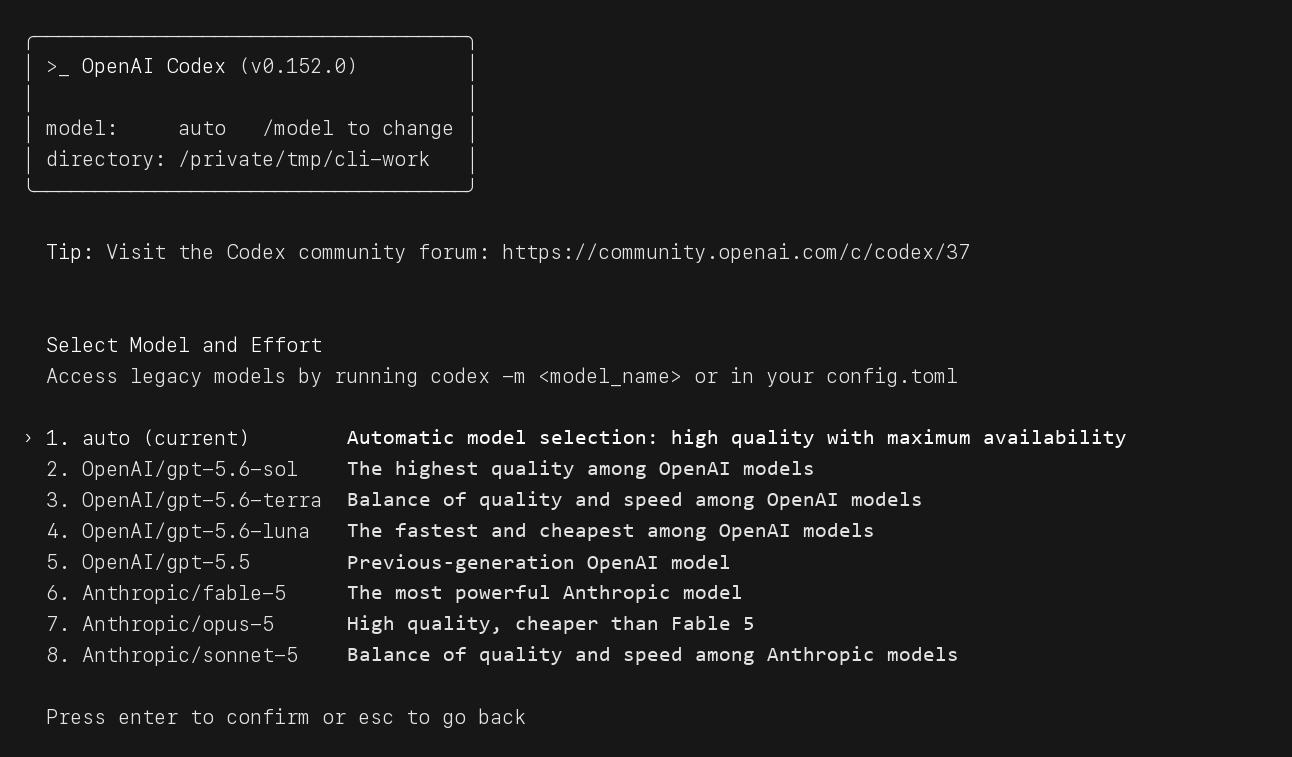
/modelauto– automatic model selection: high quality with maximum availabilityOpenAI/gpt-5.6-sol– the highest quality among OpenAI modelsOpenAI/gpt-5.6-terra– balance of quality and speed among OpenAI modelsOpenAI/gpt-5.6-luna– the fastest and cheapest among OpenAI modelsOpenAI/gpt-5.5– previous-generation OpenAI modelAnthropic/fable-5– the most powerful Anthropic modelAnthropic/opus-5– high quality, cheaper than Fable 5Anthropic/sonnet-5– balance of quality and speed among Anthropic modelsAnthropic/haiku-4.5– the fastest and cheapest among Anthropic models- The list shows eight models at a time; scroll down to see the rest
-
Send any message and make sure the model responds
- If the error
404 Not Foundappears, the key is wrong or revoked. Check the contents of~/.codex/auth.json. If that does not help, reissue the key in your personal account (the Reissue link in the Connect to Explyt block) and paste the new one
- If the error
If you use both Codex CLI and the ChatGPT app
They share the config.toml file, and the app can work only with OpenAI models.
To keep only the working models in the app while all models stay available in Codex CLI, split the catalogs:
-
In
config.toml, point to the catalog for the app:model_catalog_json = "./model-catalog.json"— and put themodel-catalog.jsonfile from the Codex in ChatGPT guide next to it -
Keep the full catalog
model-catalog-full.jsonin place as well -
Create the file
~/.codex/full.config.tomlwith a single line:model_catalog_json = "./model-catalog-full.json" -
Start Codex CLI with this profile:
codex --profile full
Requests from Codex CLI spend Explyt subscription minutes the same way as requests from the plugin. The balance is shown in your personal account.
For errors, see Error messages.