Subagents and parallel work
A subagent is a specialized agent to which the main agent hands a separate part of a large task. One subagent can explore the project, another can change code, and a third can write tests or check the result independently.

When subagents are used
Subagents can be called by the General and Orchestrator modes.
| Mode | How it works | When to choose it |
|---|---|---|
| General | Handles simple tasks itself and can call subagents if the task grows | When it is not clear upfront how many roles are needed |
| Orchestrator | Does not edit files or run tools directly; distributes the work between subagents | When a large task requires exploration, a plan, implementation, tests, and review from the start |
Specialized modes are used for subtasks:
| Subagent | Main purpose |
|---|---|
| Ask | Exploring the project and answering questions without changing files |
| Code | Changing code and files |
| Test | Creating and refining tests |
| Review | An independent check without the main file-editing tools; there is no strict read-only guarantee |
| Plan | A plan with subtasks and acceptance criteria |
| Debug | Checking hypotheses through the IDE debugger |
The full tool set and the limits of each mode are listed in the feature matrix.
Sequential and parallel work
The main agent can hand out subtasks sequentially when the result of one step is needed by the next. For example: first study the code, then build a plan, then change the implementation, and only after that run a review.
Independent subtasks can run in parallel. The model profiles documentation describes two scenarios:
- several subagents independently solve the same task on different models, after which the main agent compares the answers;
- several Review subagents check the same changes in parallel, and the main agent merges the findings and removes duplicates.
Parallel work is only suitable for independent parts. If several subagents change overlapping files at the same time, the risk of conflicts and inconsistent edits grows.
Subagent context
The main agent formulates the subtask and passes the subagent the context it needs. Subagents started in parallel do not see each other's progress. If they need shared material, it can be saved in a separate project file, provided the project rules allow it, and the final reconciliation can be left to the main agent.
The exact scheme for passing the whole parent chat history and internal data to a subagent is not fixed in the current documentation. So it is better to state important constraints, the expected result, and the paths to the relevant files explicitly in the subtask.
Background runs and resuming
A subagent can run in the background while the main agent carries on with something else. Every run is given an identifier that comes back with its result and is quoted in the message announcing that the run has finished.
That identifier is what makes a stopped run recoverable. The history a subagent accumulated is stored alongside the chat, so a run that was cancelled or that failed partway can be picked up from that history rather than from nothing. The subtask continues instead of restarting, and the exploration already done is not repeated.
This matters most when a run stops for a reason unrelated to the task. If a provider rate limit is reached, the connection drops, or the service is briefly unavailable, the run ends with an explicit pointer back to its identifier — so a long piece of work interrupted near the end does not have to be redone from the beginning.
A run that is still going cannot be resumed: there is nothing to recover yet. Wait for the completion message and then ask for the result, which the completion message itself does not carry.
You drive all of this by asking the main agent. You can ask it for the status of a background run, to stop one, to fetch the result of one that has finished, or to continue one that stopped.
The identifier is resolved against the history of the chat that produced it. A run started in a different chat, or one whose history has been cleared, can no longer be found — the main agent reports this and can only start the subtask fresh.
Tools and safety
A subagent's access to tools is determined by its mode. For example, Ask and Review are read-only, while Code can change files. Orchestrator does not perform such actions itself, but it can delegate them to a subagent with the right capabilities.
Custom modes let you explicitly define the set of tools and Skills for a specific role. The project's general restrictions still apply: for files, use Edit Scope, .readignore, and .writeignore, and check action access in the Tools menu.
Do not assume work is safe just because a subagent performs it. Set the boundaries before a task with edits, and review the overall diff in Agent Changes once it is done.
How the model is selected
By default, a subagent uses the same model as the main agent. Subagent profiles let you assign different models and reasoning settings to different types of subtasks.
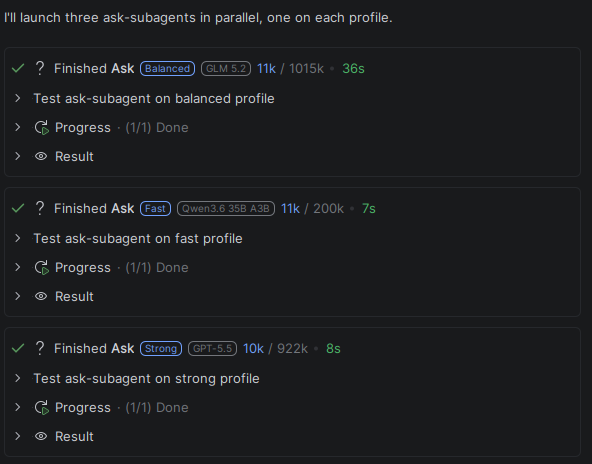
The built-in profiles:
| Profile | What tasks it is meant for |
|---|---|
fast | Quick file reads, simple searches, and brief project exploration |
balanced | Ordinary analysis and routine test generation |
strong | Complex architecture, non-trivial changes, deep review, and hard debugging |
Until a specific model is assigned to a profile, it inherits the main agent's model. The main agent selects a profile by its text description; the documentation does not promise that the same profile will be chosen in every similar task. For predictability, write profile descriptions as concrete rules for when to apply them.
How to state a large task
- Describe the overall result and the constraints.
- Say which parts can be done independently and which depend on each other.
- Forbid parallel changes to the same files.
- Name the checks and the definition of done for each subtask.
- For especially important decisions, ask for an independent analysis or Review.
- When it is finished, check the resulting changes and the run results.
An example request:
Split the task into exploration, implementation, tests, and an independent review.
Run dependent steps sequentially. Run only those parts in parallel that do not change
the same files. At the end, merge the results, run the related checks, and report
what each subagent did.