Connecting external tools to Explyt
An Explyt subscription gives you access to leading AI models through a single OpenAI-compatible gateway. Besides the Explyt plugin for JetBrains IDEs, you can connect other tools to it: Claude Code, Cursor, Cline, OpenCode, and the rest of the list below. Subscription minutes are spent the same way as when you work from the plugin.
Where to get the URL and key
You need two values to connect. Both are in your personal account in the Connect to Explyt block:
- OpenAI-compatible URL —
https://api.explyt.ai/openai/api. It is the same for all users. - API key — your personal key. Click Copy key; to see the value, click the eye icon.
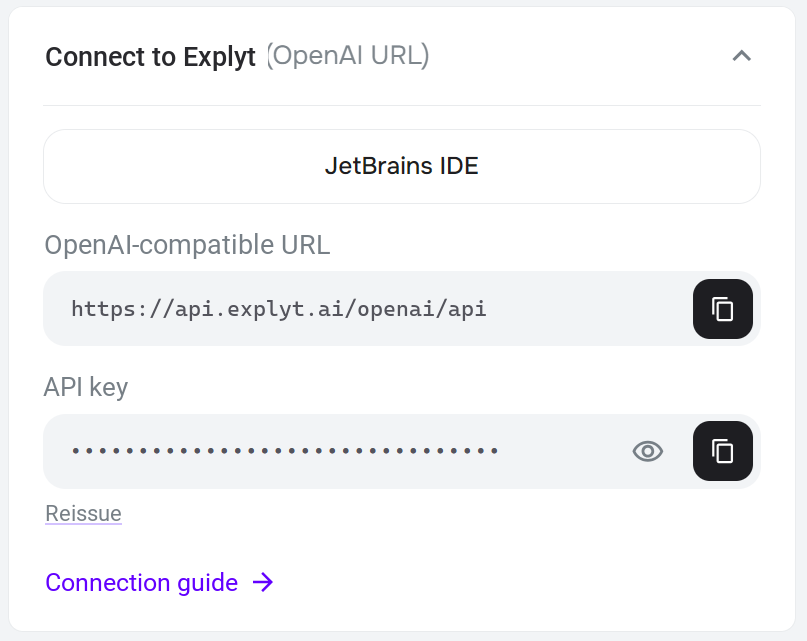
The key is shared by all tools. If the key has leaked or stopped working, click Reissue — the old key stops working immediately, and you need to put the new one into every configured tool.
If the Connect to Explyt block is not shown, activate a subscription or top up your Flex minutes balance in the same account. The terms are described on the Plans and balance page.
Choose a tool
Which models are available
The gateway provides OpenAI and Anthropic models, as well as the auto model, which picks a suitable model
on its own and ensures maximum availability. The full up-to-date list is available at
https://api.explyt.ai/openai/api/models with the key in the Authorization: Bearer <YOUR_API_KEY> header.
Some tools load this list automatically.
If something does not work
- The tool reports an invalid key or asks you to sign in again: check that you pasted the current key from your personal account, and do not sign in to the tool vendor's own account.
- Requests are rejected after a long session: you may have run out of minutes. The balance is shown in your personal account.
- Typical messages are explained on the Error messages page.