What's new in Explyt 5.16: long tasks without losing your train of work

The agent has already read the controllers and the interface implementations, found the calls by symbol, studied the tests, changed several files, and run the checks. At that point a single clarifying question can interfere with the sequence of actions in progress. A rule you set at the start of the conversation is dozens of messages and tool results back. A new chat does not solve the problem either: the context you have gathered stays in the active conversation.

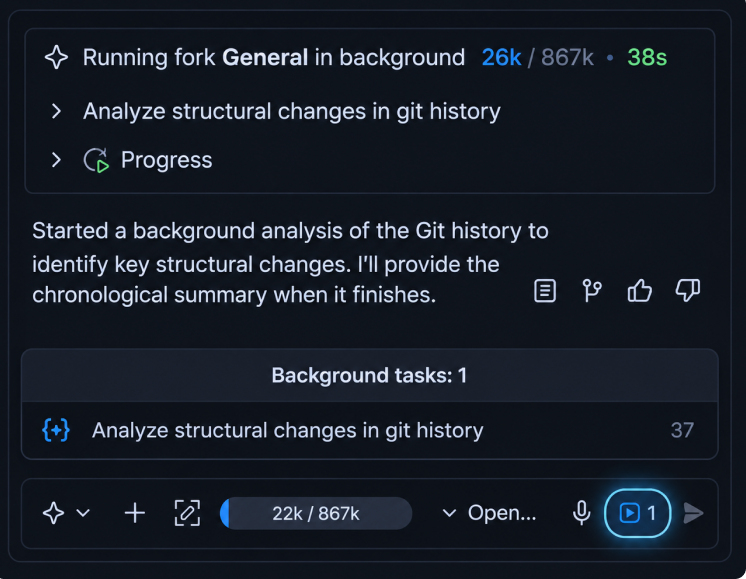
Explyt 5.16 adds mechanisms for this stage of the work. The /btw command creates a separate one-step question based on the current history while the main agent continues its task. The strictness parameter controls how user rules are passed to the model again. A visual subagent analyzes an attached image when the main model works with text only, and returns a text result to the main agent.

The release also adds support for IntelliJ Platform 2026.2, notifications about compatible updates, and changes in how chats, files, routing profiles, and MCP servers work.

Contents

Ask a quick question while the agent is busy

During a long task the agent gradually collects the project context. It reads files, searches for symbols and their usages, studies tests, changes code, and checks the result. The further the work has progressed, the more information about this specific task is already in the current conversation.

Imagine migrating a public API. The agent has found the interface implementations, read the calling code, and started changing signatures. You need to clarify why an adapter was needed and which modules are already affected. You need the answer before the whole migration is finished.

You have three options:

  1. Wait until the main task is finished.
  2. Open a new chat and pass it the necessary context again.
  3. Send a message into the active conversation, where the agent may treat the question as a change to the main task.

Explyt 5.16 introduces the /btw command for exactly this kind of clarification.

How to ask a quick question

Type the command and your question in the message field:

/btw What is this branch about and which changes have already been made in it?

Explyt creates a separate one-step request based on the context of the current conversation. The answer appears in a panel below the chat history, and the main agent continues with its previous task.

You can copy the answer or close it. The quick question and its answer are not added to the history of the main conversation, so the agent's further work continues without this side branch.

What happens after the /btw command

  1. You type /btw and formulate a single question.
  2. Explyt passes the request to the model together with the context of the current conversation.
  3. The model prepares an answer without calling tools.
  4. Explyt shows the answer in a separate panel.
  5. The main agent continues its task with the previous chat history.
  6. The question and the answer do not become part of the main dialog.

The mode uses the context that has already been collected. You do not need to describe the branch, the error you discussed, or the decision you made again, as long as the necessary information is already present in the conversation.

Which questions suit /btw

A quick question suits clarifications that can be answered from the current history:

/btw Why did the agent choose an adapter for this migration?
/btw Which cause of the error have we found so far?
/btw Which modules does the current change affect?
/btw Why is the file the agent is changing right now needed?
/btw Which testing approach did we agree on above?

In all of these examples the answer relies on information the agent has already obtained during the main task.

Which requests belong in the main chat

/btw is not suitable when answering requires a new action in the project. For example:

Find all implementations of this interface and list the incompatible signatures.
Run the module tests and explain the cause of the failure.
Read the attached screenshot and find the corresponding error in the code.

Such requests require searching, reading files, running a configuration, or analyzing an attachment. Send them to the main chat, or set them up as a separate task with access to tools.

Limitations of /btw

The mode is designed for a short, single-round clarification:

  • one question gets one answer;
  • you cannot continue a separate dialog after the answer;
  • the model does not call tools;
  • attachments are not supported;
  • the question and the answer are not stored in the main chat history;
  • the answer depends on information that is already in the current conversation.

If the context does not contain enough data, /btw cannot read an extra file or run a search on its own. In that case, take the task back to the main chat.

Why rules lose their influence in a long conversation

User rules set permanent requirements for how the agent works. They can define the edit scope, the order in which the result is verified, the answer format, or the need to agree on a plan before changing code.

For example:

Run the related tests after changing production code.
Do not edit files outside the specified directory.
Describe a plan before implementing and wait for confirmation.

Before version 5.16, Explyt passed such a rule once, in the system message at the start of the conversation. For a short task this is often enough. In a long conversation, the following gradually accumulates between the rule and the current action:

  • new user messages;
  • the contents of the files that were read;
  • search and static analysis results;
  • output from runs and tests;
  • error information;
  • the agent's intermediate decisions.

The rule stays in the history, but it is further away from the current step. The model processes the original instruction, the goal of the task, and fresh tool data at the same time. In that situation it may pay less attention to the older rule.

The likelihood of a rule being missed depends on the specific model and the length of the conversation. Even a model that follows the rule in a short task can miss it once messages and tool results have piled up. This behavior also occurs with models deployed in local infrastructure.

Repeating the instruction closer to the current action increases the chance that it is followed. It does not turn the rule into a programmatically enforced constraint, and it does not guarantee identical behavior from every model. A technical ban on changing files still requires the corresponding control mechanisms, if your workflow provides for them.

How to configure strictness

In Explyt 5.16 the moment of repetition is chosen separately for each rule file. Add the strictness field to the service block at the start of the file. The format and the scope of rule files are described in full in the user rules documentation.

---
filePattern: "**/*"
strictness: user-message
---

The field supports three values:

  • system;
  • user-message;
  • tool-call.

Each next mode repeats the rule more often. Your choice depends on when the model starts to miss the instruction and how critical it is to remind it during the work.

system: pass the rule once

---
filePattern: "**/*"
strictness: system
---

Explyt adds the rule to the system message when the conversation is created and does not repeat it afterwards. This is the previous behavior and the default value.

If the strictness field is absent, an existing file keeps working in system mode:

---
filePattern: "**/*"
---

The mode suits two cases:

  • the conversation stays short;
  • the model you selected consistently follows the instruction throughout the task.

Examples of rules for which system may be enough:

Answer in English.
List the changed files in the final report.

The rule text enters the context once, so the mode creates a minimal amount of extra content.

user-message: remind before every request

---
filePattern: "**/*"
strictness: user-message
---

Explyt repeats the rule before every new user message. If you sent three messages, the instruction appears in the context three times, each time next to a new task statement.

The mode suits requirements that must be taken into account before every request is processed:

Describe a plan before implementing and wait for confirmation.
List the affected modules when changing a public API.
If the requirements allow several solutions, ask the user to choose first.

user-message brings the instruction back into the current part of the context, but it does not repeat it after every file read, search, or test run.

tool-call: remind after every tool result

---
filePattern: "**/*"
strictness: tool-call
---

Explyt repeats the rule after every tool call result. The agent read a file, received search results, changed code, or finished a test: the instruction appears in the context again before the next step.

The mode suits short requirements that the agent must take into account after every tool call:

Do not write files outside the permitted scope.
After changing code, run the related test and read the full result.
Stop and ask for confirmation before changing a public contract.

tool-call gives the highest repetition frequency. In an agentic task with dozens of tool actions, a single rule can enter the context many times.

You can start your choice from the stage at which the model stops following the instruction. If the rule is followed throughout the task, leave system. If it gets lost between user requests, choose user-message. If the instruction has to be repeated after every file read, code change, or run, use tool-call.

There is no need to raise the frequency of all rules at once. For a large set of requirements it helps to split rules by purpose: keep the answer language in system, move plan approval to user-message, and use a short file-write restriction with tool-call.

How repeating rules affects consumption

Every repetition adds the rule text to the model context again. The extra volume depends on the length of the instruction and the number of repetitions:

rule length × number of repetitions

A short rule of a few lines in user-message mode adds a small volume. A file of a thousand lines with tool-call is passed after every tool result. In a task with dozens of reads and changes, the same text takes up context many times over.

Context tokens

The more often a rule is repeated, the more tokens the model receives in its input. A large instruction also leaves less room for the conversation history, file contents, and tool results.

That is why it is better to choose short requirements for tool-call, ones that really apply to every step. If the agent misses a single instruction from a large corporate document, move it into a separate small file and assign the frequency you need only to that file.

Per-minute billing

Explyt bills model work in minutes. Extra tokens cannot be translated directly into a proportional increase in billed minutes. The final consumption depends on the model you selected, the processing duration, and the billing terms.

When choosing a mode, evaluate two characteristics separately:

  1. How much room the rule takes up in the context.
  2. How often the model has to process that text again.

Do not pass a long document after every tool for the sake of a single requirement. Move that instruction into a separate file, assign the frequency only to it, and check the result on the model and in the scenario where the rule used to be missed.

Images in subagents

The main model may work well with code and text but not recognize images. In Explyt 5.16 the main agent can pass an attached file to a subagent whose profile uses a model with vision support.

This mechanism lets you keep the text model you selected for the main task and bring in a visual model only for the image analysis step.

How the image is passed

  1. You attach an image to a message.
  2. The main agent receives the path to the file.
  3. The agent chooses a subagent profile by the description of its purpose.
  4. The subagent passes the image to a model with vision support.
  5. The model describes the image or extracts text from it.
  6. The subagent returns a text result to the main agent.
  7. The main agent uses the result in the current task.

The main agent delegates the analysis to the subagent. The text model itself does not start recognizing images after the update.

Which tasks suit a visual subagent

  • reading an error message on a screenshot;
  • extracting text from an image;
  • comparing an implementation with an interface mockup;
  • describing screen elements;
  • checking the visible state of the interface against an attached snapshot.

The result comes back as text, which the main agent keeps working with in the current context.

How to configure the profile

Create a subagent profile and select a model for it that supports images. In the profile description, state its specific purpose, for example analyzing interface screenshots, reading errors, or extracting text.

The main agent uses the profile description when choosing an executor. The more precisely the purpose is worded, the clearer it is to the agent which tasks should call this profile.

A Model Routing profile configured to describe images and extract text

Example description:

Analyzes attached images: reads text, describes interface elements, and returns the result to the main agent.

Limitations of visual analysis

  • a separate subagent profile is required;
  • the model selected for the profile must support images;
  • the answer quality depends on the capabilities of the visual model;
  • routing accuracy depends on the profile description;
  • the subagent returns a text result, which the main agent uses in its further work.

If the main model already supports images and can handle the task on its own, there is no need to pass the file to a separate subagent.

Support for IntelliJ Platform 2026.2

Explyt 5.16 works in IDEs based on IntelliJ Platform 2026.2. Support for platforms from 2025.1 to 2026.1 is retained.

After you update the IDE to a version on platform 2026.2, you can keep working with Explyt 5.16. Switching to a separate plugin build is not required.

Update notifications

When a new compatible plugin version is released, Explyt shows a notification. You can:

  • start the update;
  • postpone the reminder for seven days;
  • skip the current version.

The plugin does not install an update without your permission.

If you do not need the reminders, turn them off in Settings → Tools → Explyt → Notifications.

More stable chats, files, routing, and MCP

Chats and interface

The selected model is now stored separately for each chat. Switching between conversations does not change the model selection in other chats.

Explyt closes chats and the editor more correctly, keeps the cursor position after an attachment is removed, and stops background tasks when a chat is closed. Binary files are easier to attach by drag and drop.

Files and updates

File writing is more resilient to errors during an agentic task. If a plugin update was interrupted by a temporary failure, Explyt retries.

Routing profiles

The provider context size is now taken into account correctly for models selected through routing profiles. The agent gets the correct available context volume both when a model is selected directly and when it is assigned through a profile.

MCP servers

Explyt handles connecting to and working with MCP servers more reliably after several integration problems were fixed.

After updating from a previous version

Existing user rules keep working unchanged. If the strictness field is absent, Explyt uses system mode and passes the rule once at the start of the conversation. You do not need to change all rule files after the update: the setting applies only where you added strictness.

Check on a real task only those rules the agent used to miss. You need a visual subagent profile if the main model does not support images and your work involves screenshots or mockups.

What to choose for your task

SituationFeature or modeWhat happens
You need to clarify a fact from the current conversation/btwExplyt gives a separate answer, and the main task continues
The answer requires reading a file, searching, or running somethingMain chat or a separate taskThe agent can call the necessary tools
The question requires an attachmentMain chat or a separate taskThe agent receives the file in a task with access to attachments
The model consistently follows the rulestrictness: systemThe instruction is passed once at the start of the conversation
The rule gets lost between requestsstrictness: user-messageThe instruction is repeated before every user message
A short requirement must be taken into account after every actionstrictness: tool-callThe instruction is repeated after every tool result
One instruction from a large file needs to be repeated more oftenSplit the file and raise the frequency of that instructionOnly the requirement you need re-enters the context
The main agent needs text from an imageA visual subagent profileThe main agent receives the text result of the analysis
The main model already recognizes imagesUse the main modelNo extra profile is needed for this request

Update Explyt

Existing rules keep their previous behavior after the update. Raise the reminder frequency selectively and check the result on the model you use and on a real task.


Install Explyt 5.16

Contact us at support@explyt.com to share feedback or submit a feature request.