Background tasks
Explyt can keep individual processes running while the agent responds to messages or works on other parts of a task. The background task indicator appears next to the message queue in the chat input.
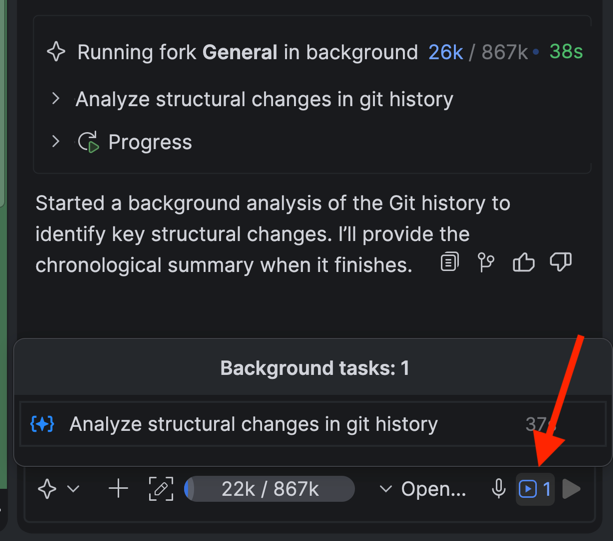
What the panel shows
Click the indicator to open the active background tasks panel. It includes:
- commands running in the terminal;
- run configurations and tests;
- subagents and forks.
Each task shows its status and the time elapsed since it started. The panel is useful when the agent is running tests, building the project, and delegating an independent piece of work to a subagent at the same time: you do not need to check each card separately.
Open a task
Select a task in the panel to jump to its original card in the chat. The card shows the command, its intermediate or final output, and any error details.
Before closing the IDE, switching branches, or changing files used by a background process, check the panel. This helps you avoid interrupting an important build, test, or subagent.
Stop a task
Stop a task from the panel if you no longer need its result or the process is taking too long. Stopping interrupts the selected process, but does not undo actions it has already completed.
Before starting it again, open the original card and check both the output and the project state. A terminal command, run configuration, or subagent may already have changed files or produced a partial result.