Plans and balance
This page collects everything about Explyt versions, minutes, subscriptions, and payment. For installation and your first task, the quickstart is enough. Come here when you are choosing a plan or topping up your balance.
First launch and choosing a plan
On the first launch of the plugin, choose the Personal, Community, or Enterprise plan. Subscriptions and the minute balance apply to the Personal plan. The first time you connect it, you get a free 30-day period and 80 minutes.
The differences between the plans are described in the Explyt plans reference.
Once the trial period ends, or if you run out of minutes, you can activate a subscription or purchase Flex minutes.
Minutes, subscription, and switching between versions
- When you activate the Personal trial, the settings show the number of available minutes and the trial expiration date.
- If your trial period ends or you run out of minutes, you can activate a subscription or buy Flex minutes, which do not expire. To do this, go to your personal account via the
Get more creditsbutton or the app.explyt.ai link and top up your minute balance. - At the end of the 30-day period, unused subscription minutes are converted to Flex minutes.
- In the settings you can switch between the Personal, Community, and Enterprise plans. Community requires your own API key; Enterprise requires a key issued by your organization.
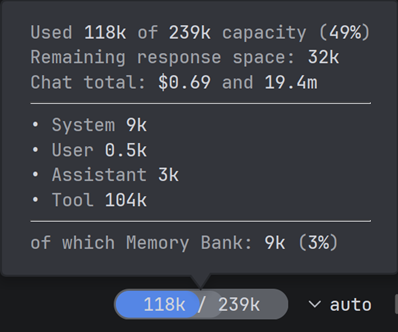
Below the chat you see the usage of the current session and the remaining balance.
How do I top up my balance?
Go to your personal account to manage your subscription and top up your balance.
- Sign in to your personal account at app.explyt.ai
- Activate your subscription and get a
50%discount - Top up your Flex minute balance by choosing one of the packages:
40,350, or1000minutes
How does the subscription work and what does it include?
- When you activate the Personal subscription,
80minutes are added. Every thirty days the number of minutes is reset to140. Unused minutes are converted to Flex minutes. - If you
cancelthe subscription, it remains active until the end of the paid thirty-day period. - If you use up all the minutes from the subscription balance before the end of the thirty-day period, you can purchase a Flex minute package.
How are requests billed?
According to our statistics, a developer makes around 180 requests to an LLM during a working day on average. With an average duration of about 10 seconds of compute per request, that is roughly 30 minutes of actual LLM compute per day. The base cost of compute without a package is $0.38 per minute.
1 minute of compute at the subscription price costs just $0.19. That's a 50% saving.
You only pay for pure API runtime, not for waiting.
How to manage your usage
The exact usage of a future task is not known in advance. Estimate it from similar work: complete a small typical task, note the usage of the current session below the chat, and compare the remaining balance before and after. For a long task, check the figure after each self-contained stage. This estimate accounts for your model, your project, and your usual context size, but it does not guarantee the same result for the next request.
For a precise measurement of a task in Community with your own OpenAI key, use the step-by-step guide with a local Bifrost.
Usage is normally affected by:
- the selected model and its compute time;
- the size of the chat history and the attached context;
- images and other large attachments;
- the number of subagents: each of them makes its own requests to the model.
To use less:
- Start a new chat for an unrelated task and compress a long history once it no longer fits into a comfortable working context.
- Attach the specific files and fragments you need instead of the whole project. For a large task, split the work into verifiable stages.
- Do not resend the same image or a long log without a reason.
- Use subagents for independent parts of a task that can genuinely run in parallel. For a short sequential edit, an extra subagent is usually unnecessary.
- Choose the model according to the complexity of the task. Simple reading and search do not always require the most resource-intensive model, and complex architectural work should not be split into many cheap attempts without verification.
Keep an eye on usage and the remaining balance below the current chat. If usage jumps sharply, check the length of the history, the attachments, and the running subagents before your next request.
What are Flex minutes?
- Flex minutes do not expire. In your personal account you can buy a package of
40,350, or1000Flex minutes. - These minutes are shown separately from the subscription balance. If a subscription is active, subscription minutes are used first, followed by Flex minutes.
Still have questions?
- Support: support@explyt.com
- Sales: sales@explyt.com