Check the API of a linked library
Use this scenario when your solution depends on an external library: you need to clarify a method signature, the behavior of a specific version, or the cause of an error at the boundary of a library call. The agent must check the dependency's code rather than answer from memory.
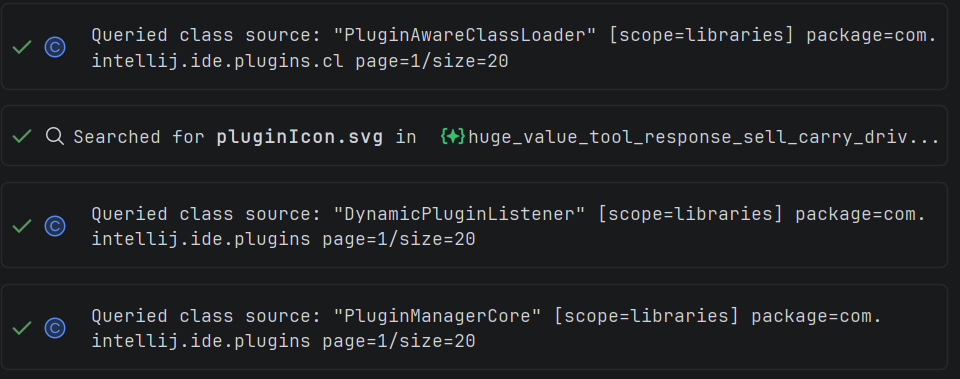
Explyt checks signatures and implementations in the version of the library that is linked to the project.
What to prepare
- attach the place where the project calls the library;
- name the dependency and your question about its API;
- add the error message or stack trace, if you have one;
- if you plan to change code, state the expected behavior and how to verify it.
Explore the dependency
- Ask the agent to find the actual declaration of the library symbol in the linked version of the dependency.
- Ask it to check the parameters, the return value, the exceptions, and any constraints that matter for your task.
- Ask it to separate facts taken from the dependency's code from assumptions.
- If the problem shows up at run time, reproduce it first and only then change the project's code.
Example prompt:
Check the implementation and the signature of this method in the version of the
library linked to the project. Explain which values it accepts, what it returns,
and under which conditions it throws an exception. Refer to the classes and
methods you found. Do not change code yet.
Verify the answer
Open the declaration it found using IDE navigation and confirm that the agent examined exactly the linked version. Compare the signature, the exceptions, and the behavior against the dependency's code.
If the investigation shows an edit is needed, keep it inside the project's code, run the related test or configuration, and review the diff. Do not edit the dependency's own code.
Definition of done
The investigation is complete when the answer relies on real symbols from the linked version, the important constraints are confirmed by the code, and the proposed change has been verified by a test or a reproducible run.
The feature in detail
The supported IDEs and how library code is read are described on the Reading code from dependencies page.
Related pages: