Connecting any tool or code over the API
Explyt Gateway is compatible with the standard OpenAI and Anthropic protocols. This means you can connect any AI tool, IDE plugin, CLI agent, official SDK, or your own code to your Explyt account, as long as it lets you set a custom base URL and API key — even if the tool is not in the list of ready-made guides.
API requests spend credits from the same balance as work in the Explyt JetBrains Plugin or Explyt CLI.
Where to get the connection details
-
Sign up at app.explyt.ai and choose the Community plan or a paid plan: the API key is not available on Free (see Plans and balance).
-
In the Connect to Explyt block, copy two values:
- OpenAI-compatible URL —
https://api.explyt.ai/openai/api(the same address for all users and protocols) - API key — your personal key (the Copy key button)
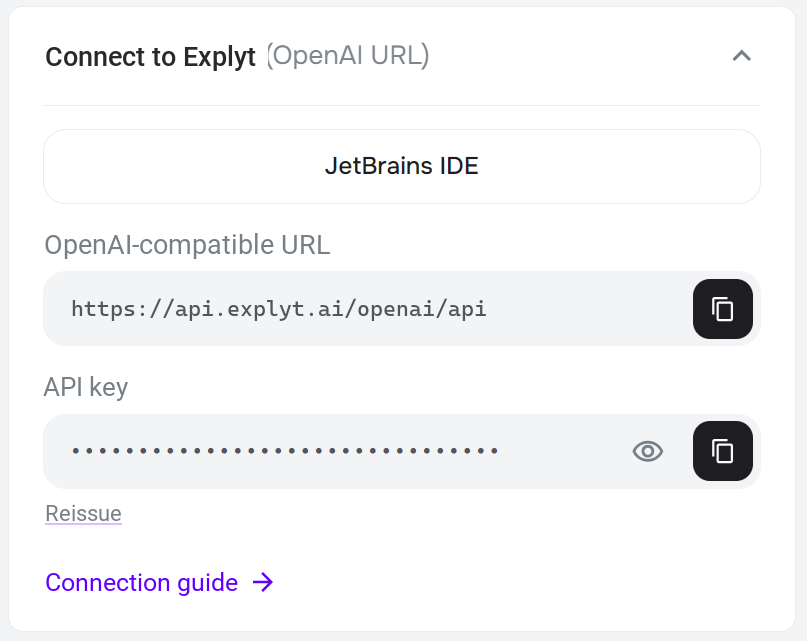
- OpenAI-compatible URL —
Supported APIs
All three protocols work through the same base URL https://api.explyt.ai/openai/api and the same personal API key:
| Protocol | Endpoint | Full request URL |
|---|---|---|
| OpenAI Chat Completions API | POST /v1/chat/completions | https://api.explyt.ai/openai/api/v1/chat/completions |
| OpenAI Responses API | POST /v1/responses | https://api.explyt.ai/openai/api/v1/responses |
| Anthropic Messages API | POST /v1/messages | https://api.explyt.ai/openai/api/v1/messages |
Most SDKs and tools append /v1/... to the base address themselves — for them, use https://api.explyt.ai/openai/api. If a tool or HTTP client does not add /v1 automatically, use https://api.explyt.ai/openai/api/v1.
Setup examples
With environment variables
Many CLI agents, utilities, and the official OpenAI and Anthropic SDKs read the gateway address and key from environment variables:
- OpenAI SDK and tools
- Anthropic SDK and tools
export OPENAI_BASE_URL="https://api.explyt.ai/openai/api"
export OPENAI_API_KEY="<YOUR_API_KEY>"
export ANTHROPIC_BASE_URL="https://api.explyt.ai/openai/api"
export ANTHROPIC_API_KEY="<YOUR_API_KEY>"
Replace <YOUR_API_KEY> with the personal API key from your personal account.
Sample curl requests
- OpenAI Chat Completions
- OpenAI Responses
- Anthropic Messages
curl https://api.explyt.ai/openai/api/v1/chat/completions \
  -H "Content-Type: application/json" \
  -H "Authorization: Bearer <YOUR_API_KEY>" \
  -d '{
    "model": "OpenAI/gpt-6.1-sol",
    "messages": [
      {"role": "user", "content": "Hi! Write a short sorting function in Python."}
    ]
  }'
curl https://api.explyt.ai/openai/api/v1/responses \
  -H "Content-Type: application/json" \
  -H "Authorization: Bearer <YOUR_API_KEY>" \
  -d '{
    "model": "OpenAI/gpt-6.1-sol",
    "input": "Hi! Write a short sorting function in Python."
  }'
curl https://api.explyt.ai/openai/api/v1/messages \
  -H "Content-Type: application/json" \
  -H "Authorization: Bearer <YOUR_API_KEY>" \
  -H "anthropic-version: 2023-06-01" \
  -d '{
    "model": "Anthropic/sonnet-5.5",
    "max_tokens": 1024,
    "messages": [
      {"role": "user", "content": "Hi! Write a short sorting function in Python."}
    ]
  }'
For the Anthropic protocol, you can authenticate either with the Authorization: Bearer <YOUR_API_KEY> header or with x-api-key: <YOUR_API_KEY>.
Available models
Main recommended models:
autobalanced: automatic selection among mid-range models, available on every planautofrontier: automatic selection among frontier models, Personal plan and higherAnthropic/opus-5.5: Anthropic model with high-quality answers, Personal plan and higherAnthropic/sonnet-5.5: balance of quality and speed among Anthropic models, Personal plan and higherOpenAI/gpt-6.1-sol: general-purpose OpenAI model, Personal plan and higher
To get the full up-to-date list of models, send a request to https://api.explyt.ai/openai/api/models:
curl https://api.explyt.ai/openai/api/models \
  -H "Authorization: Bearer <YOUR_API_KEY>"
For more on choosing models and automatic selection modes, see Models and automatic model selection and the connections overview.
Error codes
Typical gateway responses (401 Unauthorized, 429 Too Many Requests, model not found) and how to fix them are covered on the Error messages page.