Models and automatic model selection
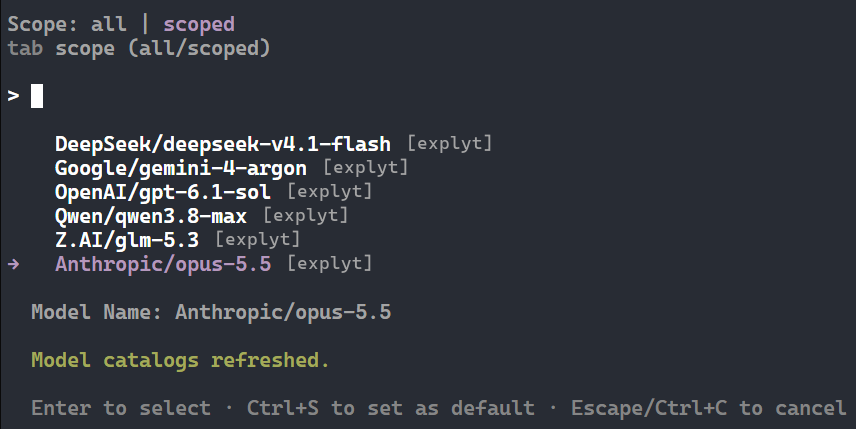
An Explyt plan gives the CLI access to models from Anthropic, OpenAI, Google, Z.AI, Moonshot, Qwen, and DeepSeek. You don't need separate keys or subscriptions for each provider: you sign in to your Explyt account and pick a model for the task.
Why it matters
- One account instead of several. Compare models on your own task without new sign-ups or keys.
- A model for the task. For example, start a task on Opus, check the solution with GPT, and hand routine work to Qwen or GLM. You can change the model in the middle of a session.
- One balance. Every model spends credits from the same balance. Current plans are at explyt.ai/pricing.
How the model affects credit usage
A request costs as many credits as its tokens cost at the model provider's prices, see How are requests billed?. Stronger models cost more per token, so it makes sense to give hard tasks to a strong model and routine work to an inexpensive one.
How to connect your account
- Start the agent with
explyt. - Type
/loginand choose to sign in with your Explyt account. - Type
/modeland choose a model.
See the quickstart.
How to switch models
| Method | What it does |
|---|---|
/model | Opens the model picker |
Shift+Tab | Quick switch: permission mode, model, and reasoning level in one go |
Ctrl+P | Cycles through the models in the quick-switch list |
/scoped-models | Turns models on and off for Ctrl+P switching |
The CLI remembers the last five models you picked and shows them next to the current one in the quick switch.
Automatic model selection: autofree, autobalanced, autofrontier
If you'd rather not pick a model yourself, choose one of the routers in /model. Each sends requests to a model from its own group:
| Router | Which models it uses | Plans |
|---|---|---|
autofree | Inexpensive models, no credits spent: up to 300 requests a day per device and 500 per IP address | All plans |
autobalanced | Mid-range models such as Sonnet, Haiku, and Luna | All plans |
autofrontier | Tier-1 models such as Opus and GPT Sol | Personal, Pro, Ultra |
autofree suits simple routine work. autobalanced is a good default for everyday tasks. autofrontier is for hard tasks where you want a frontier model without picking one by hand. See Plans and balance.
Models for subagents
The main agent can start helpers on other models. To do this, create a model profile: a Markdown file in ~/.explyt/models/ (for all projects) or <project>/.explyt/models/ (for one project):
---
name: strong
description: Hard reviews, architecture, difficult debugging.
model: anthropic/claude-opus-5
effort: high
---
The model value must exactly match a model string available on this machine. The easiest way is to ask the agent to create the profile: it checks the list of available models itself. See Subagents.
Limitations
- The set of models depends on the plan: named tier-1 models start with Personal, tier-0 models are available only on Ultra.
- With your own keys or a local model, only the models of providers you connected yourself are available. See Your own providers and local models.