Memory Bank
0. Before you start
What is Memory Bank?
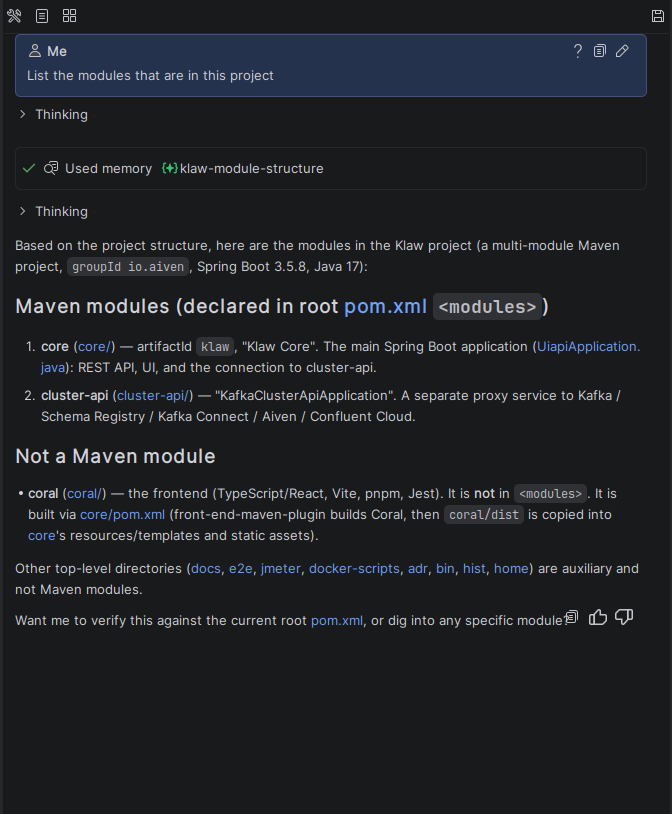
Memory Bank is the agent's long-term memory that persists across chats and sessions. Normally, each new chat starts from scratch — the agent doesn't remember your preferences, project agreements, or earlier conclusions. Memory Bank fixes this: the agent records an important fact once and reuses it in any future conversation.
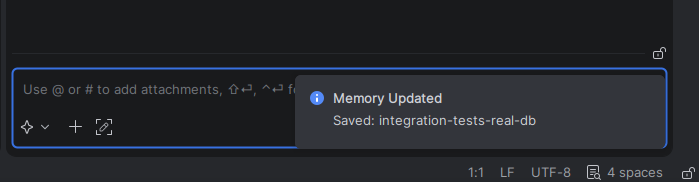
For example, you say once: "our integration tests always hit the real database, don't mock it." The agent saves this rule, and in later chats it follows it automatically, no reminders needed.
No need to re-explain the project structure, libraries, code style, or team agreements every time. On complex projects this adds up fast.
Memory lives in your project — in the .explyt/memory/ folder. Plain Markdown files, readable and editable by hand.
What does the agent remember?
Only durable, non-obvious knowledge that will be useful later. Each entry has one of four types:
- User — your role, expertise, knowledge level. Helps the agent tailor explanations.
- Feedback — your corrections and confirmed preferences on style and approach.
- Project — non-obvious knowledge about the project: pitfalls, why decisions were made, current agreements and deadlines.
- Reference — pointers to external sources: issue tracker, dashboards, channels.
The agent deliberately skips things that are easy to reconstruct from code or git history: class locations, method signatures, directory structure. It also never stores secrets, passwords, or personal data.
1. How to enable
Settings: Settings → Tools → Explyt → Memory Bank
Three toggles:
- Enable Memory Bank — the master switch. Turns on the memory policy, the knowledge index, and the memory tools. Without it, nothing else works.
- Auto-extract memories after each turn — the agent decides what's worth keeping after your messages and saves it in the background.
- Run periodic consolidation (dream) — periodic cleanup: merging similar entries, removing duplicates and stale facts.
2. How it works
You barely need to do anything manually. Three processes run in the background.
Recall
At the start of each response, the agent sees a compact index of everything saved (title + one-line hint). If something matches your request, the agent opens that entry and considers it. No keywords needed.
Extraction
With Auto-extract on, the agent analyzes the conversation after your messages (and when you close a chat) and saves what it considers useful. It happens in the background; a notification shows up when something is saved.
Consolidation (Dream)
With Run periodic consolidation on, the agent occasionally tidies up: merges duplicates, removes outdated entries, cleans the index. Keeps the memory compact.
3. Manual memory management
You can use natural language commands in the chat:
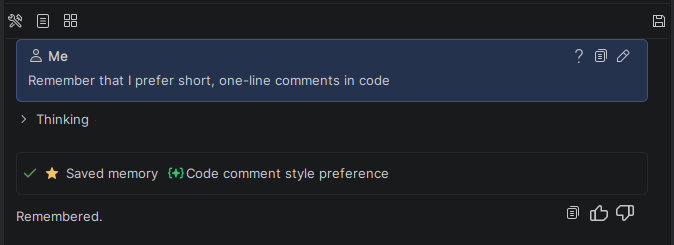
- "Remember that..." — the agent creates a new entry.
- "Update the entry about..." — the agent modifies an existing entry.
- "Forget about..." — the agent removes that entry (or just the specified detail, leaving other facts intact).
If you ask to forget one detail from an entry that also contains other useful facts, the agent removes just that detail and keeps the rest.
Editing files directly
Memory files are regular Markdown in .explyt/memory/. You can open and edit them like any other file. MEMORY.md is the index.
4. Where the data lives
<project root>/
└── .explyt/
    └── memory/
        ├── MEMORY.md                    ← index of all entries
        ├── user-prefers-pdf-export-….md ← individual entry
        ├── authfilter-x-token-….md      ← individual entry
        └── …
Each entry is a Markdown file with a small YAML header (name, short description, type) and a body.
5. Recommendations
- Enable auto-extraction and consolidation. Memory maintains itself after that.
- Confirm good decisions. The agent records not just corrections ("don't do that") but also confirmations ("yes, exactly"). A short "great, keep it" helps it lock in the right approach.
- Write durable rules. Facts that stay true for a long time are best: project conventions, incident causes, team agreements.
- Don't store temporary stuff. Current task state, notes, and drafts belong in plans and task lists, not memory.
6. Frequently asked questions
Does memory send my data anywhere?
No. Files stay locally in your project (.explyt/memory/). Only what a regular chat would send goes to the model: the memory index and any entries the agent opens for your request.
Will my secrets end up in memory?
No. The agent has rules against saving secrets, credentials, or personal data. Still, keep sensitive stuff out of .explyt/memory/.
How do I turn it off completely? Uncheck Enable Memory Bank in settings. Memory stops appearing in the agent's context, and the memory tools become unavailable.
Can I stop the agent from using memory for one request? Yes. Just ask it to ignore memory for that request — it won't access saved facts or reference them.
Does memory eat context space? No. Only the compact index (title + hint per entry) is always in context. Full content loads only for relevant entries.