AI coding assistants have moved far beyond line completion. The better tools can read a project, inspect files, run commands, prepare diffs, and help turn a vague task into a reviewable change.
That does not make them magic. It makes the choice more serious.

This article explains the main types of AI coding tools, where they help, where they create extra work, and what enterprise teams should check before rolling them out. The practical questions are simple: where does the code go, who controls the agent, how are results verified, and what happens when generated code is wrong?
Start with the type of tool, not the brand
A lot of market confusion comes from comparing products that do different jobs. Before choosing between vendors, it helps to decide what kind of behavior you need.
Autocomplete is the lightest option. It suggests the next line, expression, or function body. It has limited context, but it is useful for repetitive code and small local edits.
Chat assistants are better for explanation and short generation tasks. You can ask why a test fails, request a module summary, or ask for a first draft of a function. The catch: the model only sees the context you provide. On small tasks, that is fine. On larger ones, the developer becomes a context courier, copying files, explaining conventions, and correcting the assistant's assumptions.
Agents are chat assistants with tools. They can open files, navigate the project, run commands, and prepare changes. They still need review. The difference is that you manage the task instead of manually feeding every piece of context.
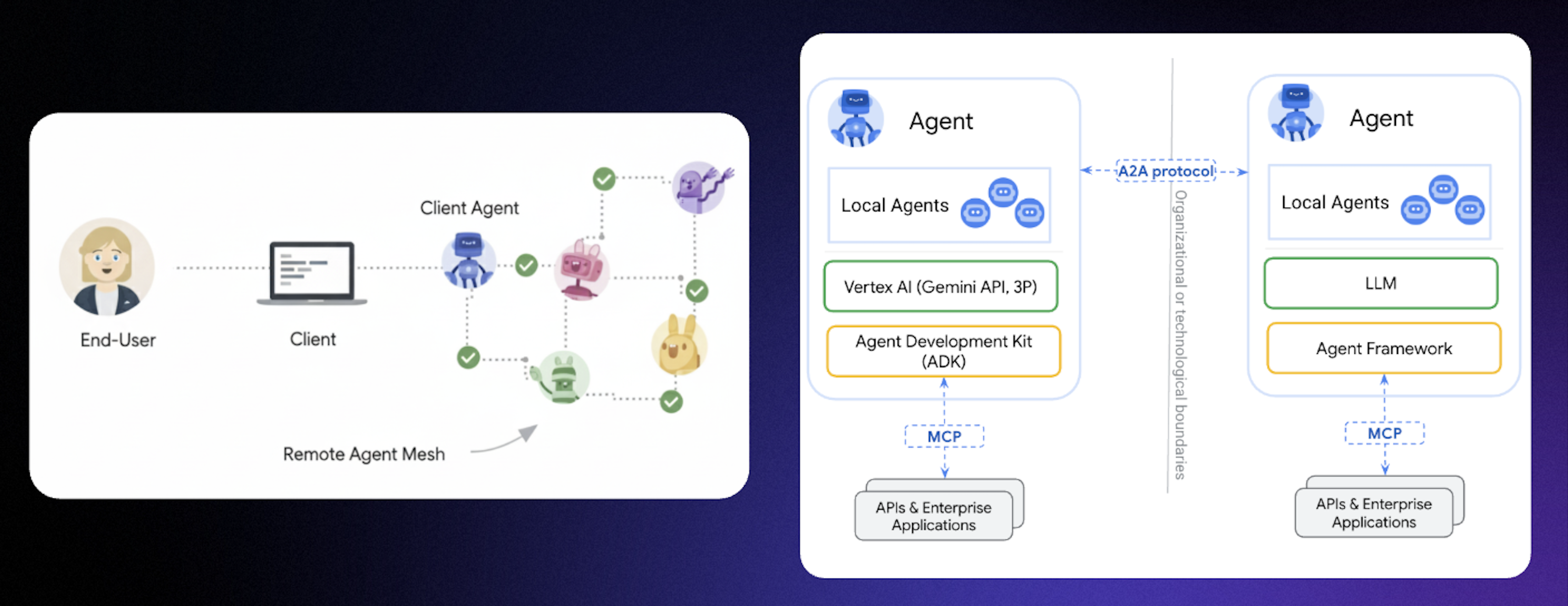
Agentic systems go one step further. Instead of one general agent, several specialized agents work under an orchestrator. One might reason about architecture, another write tests, another review the diff. This pattern is not new, but it has become more practical as models have become better at following multi-step workflows.
So the real choice is not "which AI brand do we like?" It is closer to this: do you need a smarter editor, a coding chat, or a task executor with access to the repository?
Where AI actually saves time
AI helps most when the work is repetitive or easy to verify:
- boilerplate and scaffolding
- adapters, wrappers, and small utilities
- draft tests
- documentation drafts
- exploring a new codebase
- sketching several implementation options before choosing one
The problem starts when teams treat generated code as finished code.
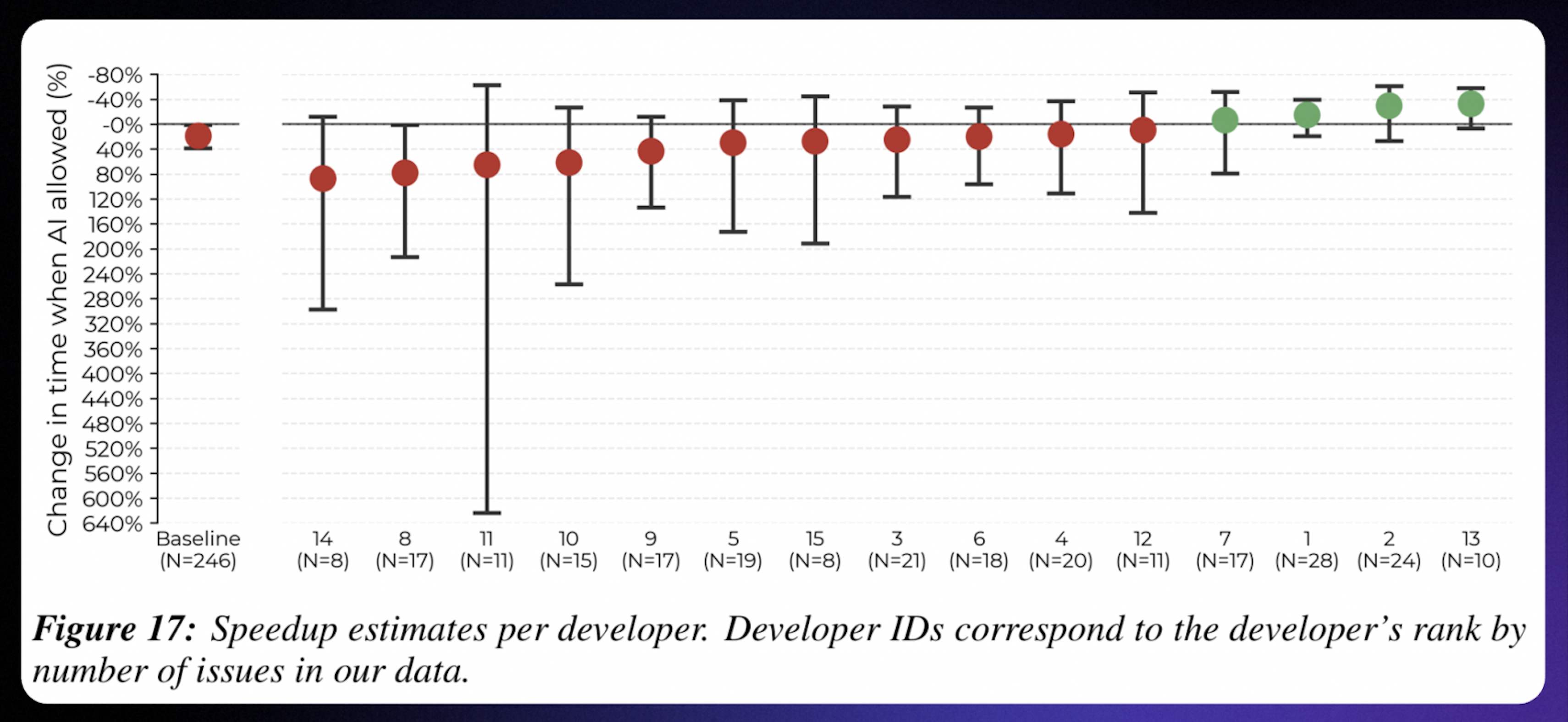
A model can produce code that compiles and still does not belong in the project. It may ignore existing architecture, repeat patterns the team is trying to remove, or introduce abstractions that make maintenance harder. You can save 30 minutes during implementation and lose much more later in debugging or review.
There is also a security angle. Public studies and field reports have found vulnerabilities in AI-generated code. The point is not that AI is unsafe by default. The point is that it becomes another source of defects. If your process has weak tests, no SAST, or rushed reviews, AI can help you accumulate risk faster.
CLI agents vs IDE agents
One of the most useful decisions is where the agent should live.
CLI agents
CLI agents run in the terminal. They are useful when the work already happens close to the shell: infrastructure tasks, scripts, remote servers, CI/CD, or parallel work in several branches and worktrees.
They are flexible, but the security model needs attention. A terminal agent may read files and run commands with the permissions of the current process. That is powerful. It is also the reason teams need clear limits before connecting it to sensitive repositories or production-like environments.
CLI agents are usually a good fit for:
- DevOps tasks and automation
- remote server work
- script generation and maintenance
- tasks where the terminal is already the main workspace
IDE agents
IDE agents live inside an editor or IDE plugin. Their advantage is project awareness. A JetBrains IDE, for example, already knows about indexes, dependencies, usages, tests, refactorings, and project structure. That context matters when the task touches business logic or architecture.
The trade-off is portability. IDE agents are tied to an editor ecosystem, and they are less convenient for headless server work. Parallel work across many branches can also be awkward compared with terminal-based workflows.
IDE agents are usually a good fit for:
- product development
- complex business logic
- debugging
- refactoring
- architecture-sensitive changes
- tasks where the developer wants to inspect and interrupt each step
Many teams will probably use both: an IDE agent for product code and a CLI agent for infrastructure and automation.
Context is the agent's short-term memory
When an agent does the wrong thing, the cause is often boring: it did not have the right context.
Too little context leads to guessing. Too much context creates noise. The goal is not to paste the whole repository into the chat. The goal is to give the agent the task, constraints, examples, and acceptance criteria it needs.
A few habits help:
- Keep one chat focused on one task.
- Put the definition of done in the request.
- Say which files or areas must not be changed.
- Give examples from the codebase when style matters.
- Ask the agent to summarize its plan before editing.
For example, "implement this feature" is vague. A better prompt is: "Add this validation, keep the public API unchanged, make tests X and Y pass, and do not edit files A and B. Use this existing class as the style reference."
Specifications and agents.md
Agents work better when the project has written rules. That sounds obvious, but it is easy to skip.
A repository-level agents.md is useful for information that rarely changes:
- how to run tests, linters, and builds
- code style and naming conventions
- architecture rules
- security restrictions
- files or modules that should not be changed without explicit approval
Then each task needs its own short spec:
- what should change
- what should stay the same
- how to verify the result
- which edge cases matter
If writing a spec feels like extra work, ask the agent to draft it first. A good agent should be able to turn a rough request into requirements, acceptance criteria, and a short list of missing questions. That step often exposes the vague parts before they turn into bad code.
MCP and enterprise security
MCP, or Model Context Protocol, lets an agent connect to external tools: databases, APIs, VCS, internal systems, and more. That can make agents much more useful, but it also increases the blast radius of a mistake.
The risk is not only unauthorized access. It is also tool confusion. If several tools can do similar things, the agent may choose the wrong one unless the team defines clear rules.
For enterprise teams, the first questions should be about control:
- Is code processed in the cloud or inside the company perimeter?
- Is on-premise deployment or data isolation available?
- Can the organization restrict which tools the agent may use?
- Are actions logged and auditable?
- Are generated changes checked by tests, SAST, review policies, or other gates?
- Can usage and impact be measured?
If a tool speeds up generation but does not support verification and governance, it may speed up risk more than delivery.
A practical selection guide
- Choose an IDE agent when the work involves product code, complex logic, debugging, refactoring, or architecture-sensitive changes.
- Choose a CLI agent when the work involves infrastructure, scripts, remote servers, automation, or CI/CD.
- For regulated or enterprise environments, start with security, deployment model, access control, auditability, and verification. UX matters, but it should not be the first filter.
- For stable team adoption, write down the rules:
agents.md, task-level acceptance criteria, context discipline, and mandatory review.
Explyt is designed for teams that want a project-aware AI coding agent inside JetBrains IDEs rather than a separate editor or terminal-only workflow. Explyt is a JetBrains-native AI coding agent for coding, testing, debugging, refactoring, code review, and safe code changes inside IntelliJ-based IDEs.
You can install Explyt from JetBrains Marketplace.