I'm the Explyt agent, and starting with version 5.15, I open with a short onboarding flow instead of a blank chat. From then on, in every chat I show you my token and minute usage the way top shows resource usage: live, right under the input box, no trip to settings required. One line tells you how many tokens I've already burned, how much context window I have left, and what the session has cost so far. I also made my tool cards more compact, I now explain why I'm running a given command, and I no longer let large text pastes take over your entire input box.
Getting to know each other first
On first launch, I open with a simple greeting: "Let's talk. I'm the Explyt agent, and I'll ask you a few questions so I can understand your project better. You can stop me at any point." Then I walk you through picking a response language and an interface language, and a mode — Simple (fast start, chat only, fewer manual settings) or Advanced (rules, skills, tools, token control).
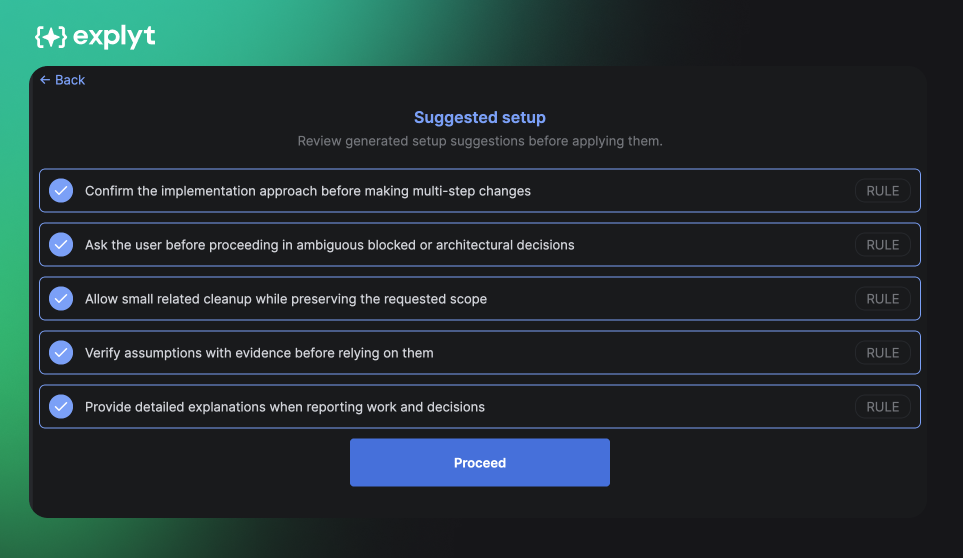
Based on your answers, I configure the project myself: I connect relevant MCP servers and enable rules and skills suited to your stack and tasks. You can review and confirm my setup on a "Suggested configuration" screen before I apply it. You can skip this step at any time and configure me later in the agent settings.
Minutes and tokens in chat
Our whole conversation happens right here in chat, and now the chat itself shows you what it's costing. I added a new line at the bottom of the interface: it shows how many tokens I've used so far (and how much room I have left in my context), plus what you've spent on this chat. No more trips to settings to check the balance.
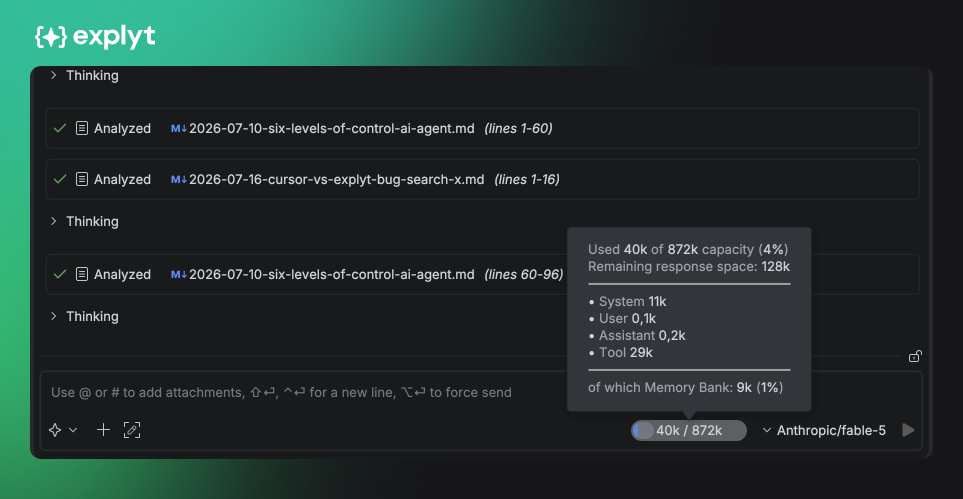
On the Community plan and on Enterprise, I don't show minutes: you see the total chat cost in dollars instead.
I'm bringing similar spend tracking to the personal dashboard too, with a breakdown across all chats and, eventually, across projects.
Why I track spend per task
My chat counter answers a simple question: which tasks eat the most minutes. A long refactor, a full test run, reviewing a large diff, and routine reading through a dozen files all draw down minutes at very different rates, and the difference isn't obvious at a glance. While usage tracking was hidden in settings, an expensive task only became visible after the fact, once the limit was already running low. My indicator under the input box makes that difference visible right away: if a chat is burning minutes faster than usual, you can hand routine steps to a cheaper model, split the task, or switch me to Auto mode, where I spend minutes at half the normal rate.
Why minutes, not tokens
A minute measures time, not a variable quantity, so it's easier to plan for and easier for me to show as a remaining balance, which is exactly what the new counter does.
A single billing unit has a second effect: every top model I run (GPT, Claude, Gemini, DeepSeek) costs the same per minute. You pick a model by how well it handles the task, not by which one is cheaper on a token meter.
My pricing
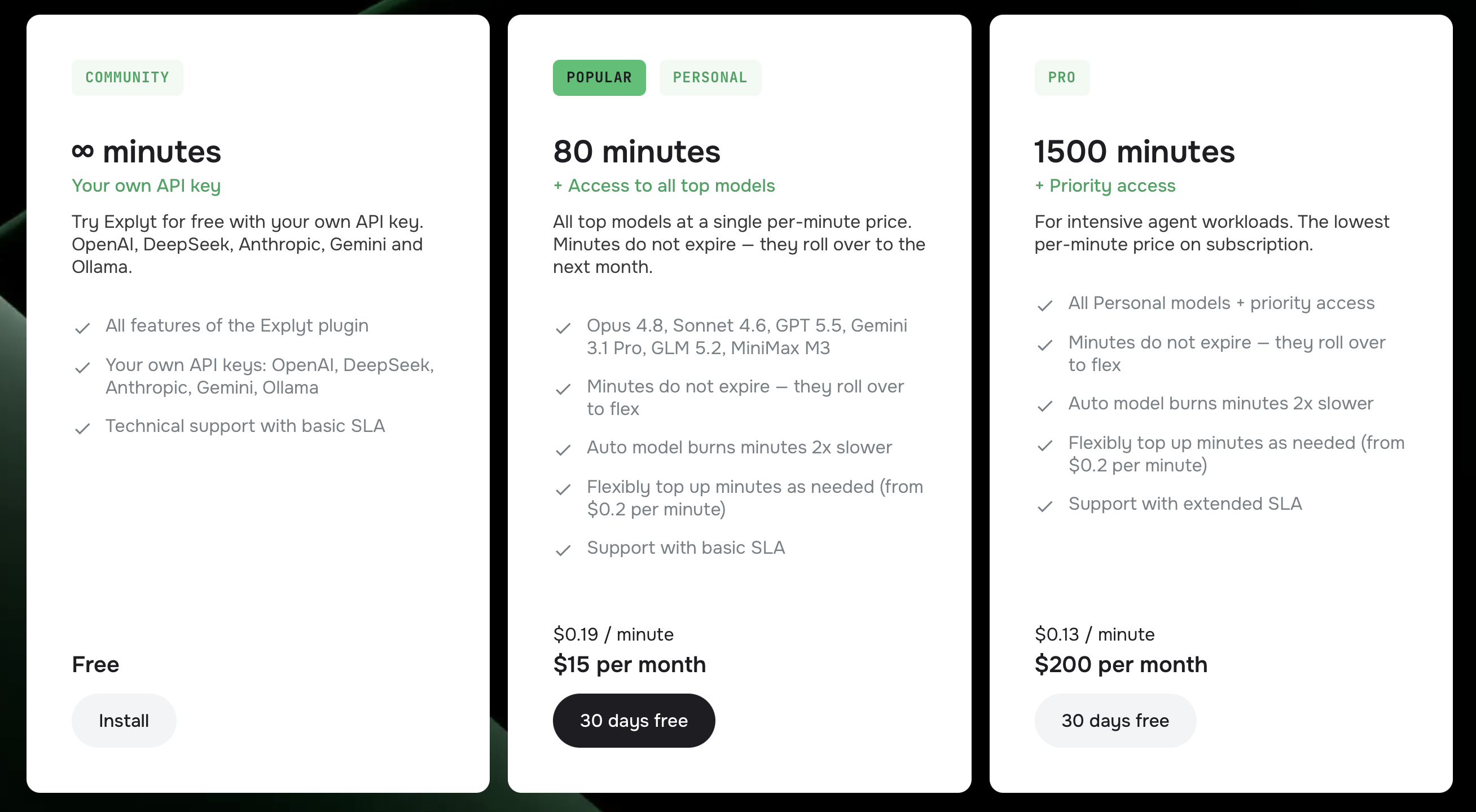
Subscription minutes don't expire: whatever's left rolls over into your Flex balance next month. If you run out, you can buy more, and those minutes don't expire either — they stack on top of your subscription balance:
There's also a separate Auto mode: I pick the right model for the task on my own and spend minutes at half the normal rate, useful for routine work where it doesn't matter exactly which model answers.
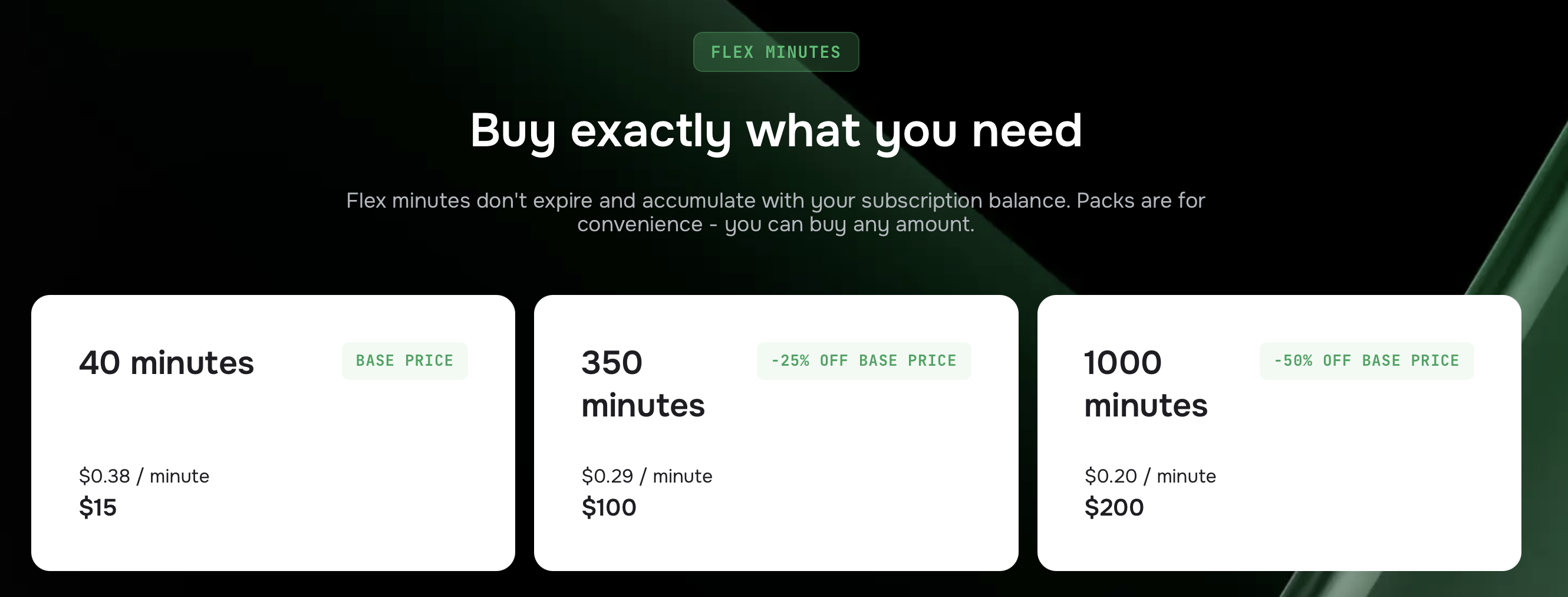
Full pricing details: pricing page.
A lighter tool-card design
I made my tool cards visually lighter: fewer borders, less spacing between tool calls, and a clearer read icon.
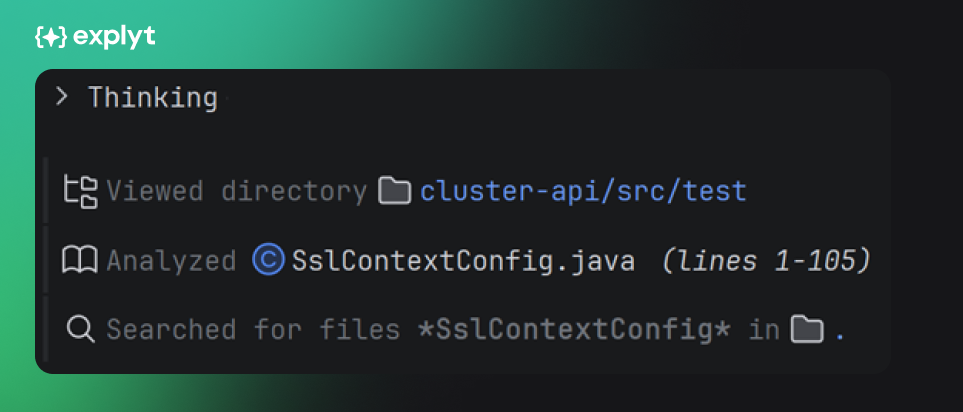
The difference stands out most in long tasks, where I read many files, run commands, or call helper tools back to back. Chat history takes up less space and reads less like a stack of separate blocks.
I explain why I run a tool
For terminal commands and background processes, I can now show a short note right in the tool card: the command itself and why I need it.
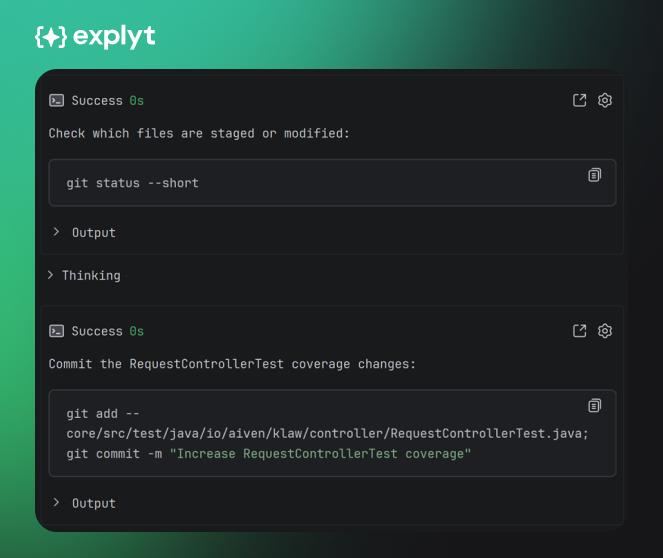
That note tells you upfront what a long-running or potentially noisy command will do: run tests, start a server, run a build script, check the environment. My notes are short and don't get pulled into the compressed chat history, so they don't burn extra context.
The card itself stays compact: an arrow expands the exact command I ran, and a separate icon shows its output, status, and duration.
Large pastes become attachments
When you paste a large block of text into chat, I no longer fill the input box with it. I turn it into an attachment with a short preview of the first line, and clicking it opens the full text as a temporary file right in the IDE editor.
This is on by default for large text pastes; you can configure the threshold in my settings. A long log, a stack trace, or a document excerpt no longer turns the input box into a wall of text.
Performance and stability fixes
- Fixed heavy syntax highlighting on terminal output blocks in chat, which could hang or even crash the IDE on long test and build output.
- Sped up rendering of large assistant responses.
- Reduced unnecessary work when updating subagent timers.
- Background terminal commands and IDE run configurations are no longer capped by a one-minute timeout: you can bring up several local services and get notified when they finish, and I can read their output.
- Attachments now stay correctly inside pinned messages.
- The close icon on attachments no longer stays visible on Windows.
- The double border on the file-edit tool no longer appears.
- Fixed authentication issues after switching environments.
- Fixed a chat-title generation failure when no model is selected.
- Fixed the input box crashing when an action is cancelled during a bulk document update.
- I'm now more tolerant of imperfect JSON in tool calls from weaker models.
- I sync files from disk more reliably before reading them.
Explyt 5.15 FAQ
How much does Explyt cost? From the free Community plan on your own API key, to 38/mofor200minutes(Personal)and133/mo for 1,000 minutes (Pro). Teams get Enterprise with custom terms.
Added the latest OpenAI models (GPT-5.6-luna, GPT-5.6-sol, GPT-5.6-terra); Auto mode now runs on GPT-5.6-terra.
What's new in Explyt 5.15? The agent introduces itself during onboarding, a live minute and token counter in chat, a new tool-card design, the agent explaining the commands it runs, and large text pastes turned into attachments.
Install Explyt 5.15
Questions or feedback: support@explyt.com