Explyt 5.12 helps developers spend less time managing the AI assistant and more time finishing IDE tasks. This release adds the General agent for mixed coding workflows, inline prompt attachments for selected code, Test mode support in more JetBrains IDEs, a clearer Agent Changes review window, Simple mode for chat, and stability fixes for long agent tasks.
Explyt is a JetBrains-native AI coding agent for coding, testing, debugging, refactoring, code review, and project-aware code changes inside IntelliJ-based IDEs.
What is new in Explyt 5.12?
Here are the major user-facing improvements:
- general agent mode for tasks that combine code changes, project search, tests, and review
- inline attachments in the prompt field for selected code and files
- Test mode availability in Rider, WebStorm, and PyCharm
- broader dependency code reading in mixed-language IDE setups
- Agent Changes window for reviewing AI edits before accepting them
- Simple chat mode for a cleaner interface
- stability and performance fixes for long chats, subagents, MCP, and account initialization.
These changes mostly reduce workflow friction. You can describe a task, give the agent the right code context faster, and check the result before it lands in your project.
General agent: Use one mode for mixed IDE tasks
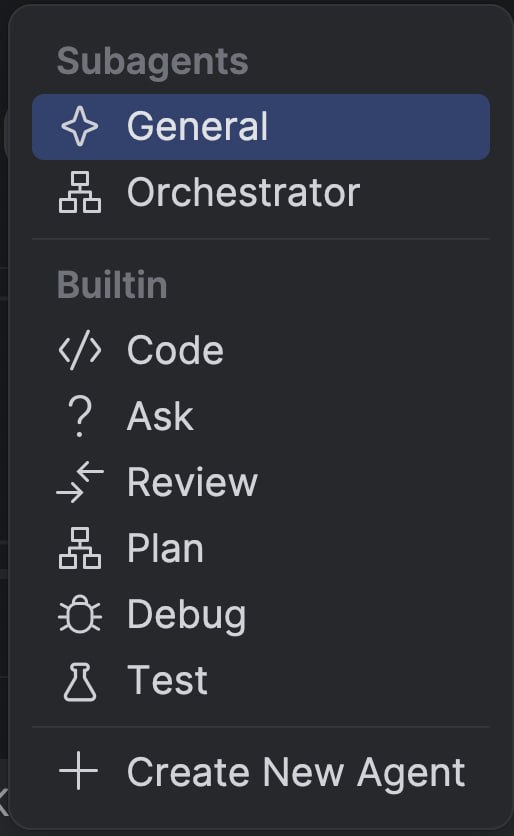
The new General agent is designed for tasks where you do not want to choose a specialized mode upfront. Code, Ask, Test, Plan, Review, and Debug modes are still available, but General is better when the work may move across several steps.
For simple requests, General handles the task itself. For larger tasks, it can call subagents for focused work such as project inspection, code editing, test preparation, or review.
This is useful when a small request grows into a real change. For example, you may start by asking why a method fails, then need the agent to find related files, update code, add tests, and review the diff. General keeps that flow in one place instead of forcing you to switch modes manually.
Inline attachments: give the agent code context faster
Explyt 5.12 makes it easier to attach code to a prompt. Select a fragment in the editor, switch to chat, and Explyt adds the selected code as context.
Attachments now appear directly inside the input field. You can remove them, type before or after them, and combine a file or code fragment with clear instructions in one prompt.
This helps when you want the agent to explain a suspicious method, fix a small error, review a selected block, or use a file as context without making it search the whole project.
Test mode now works in Rider, WebStorm, and PyCharm
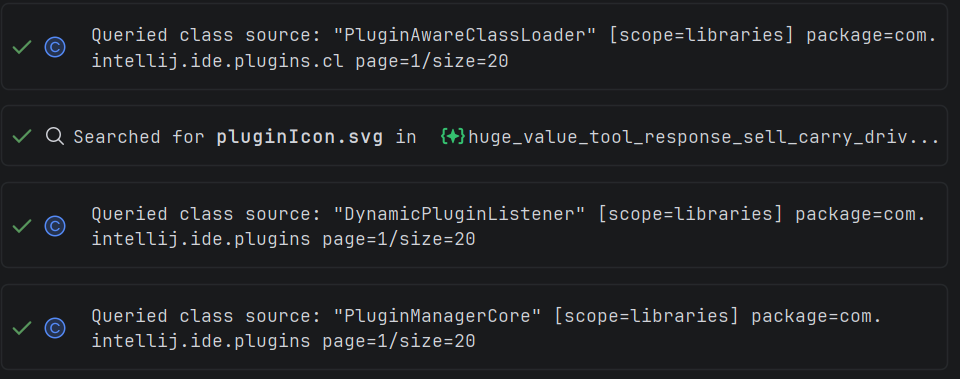
Test mode is available in more JetBrains IDEs in Explyt 5.12. It was previously focused on IntelliJ IDEA for Java and Kotlin. You can now use it in Rider, WebStorm, and PyCharm as well.
This matters if your team writes tests in the IDE where the project already lives. A C# developer can stay in Rider, a TypeScript developer can stay in WebStorm, and a Python developer can stay in PyCharm while asking Explyt to generate or improve tests.
Dependency code reading also works better in mixed setups. Explyt can inspect JVM libraries in IntelliJ IDEA, Python libraries in PyCharm, and .NET dependencies in Rider. In 5.12, it handles projects with extra language plugins more reliably. For example, if the Python plugin is installed in IntelliJ IDEA, the agent can look up Python symbols next to Java code. Python lookup also works better with partial symbol names.
Agent Changes window: review AI edits before accepting them
Explyt 5.12 adds a clearer review flow for agent edits. Changes are now open in a separate Agent Changes window, similar to the changes list developers use before a commit.
The window shows files from the active chat, lets you open diffs, move between changed files, and accept or reject edits in batches. Changes from different chats stay separate.
This gives you more control over AI-assisted coding. If the agent updates several files, you can review the work as a set, keep the useful changes, and reject anything that does not belong in the task.
Simple mode: a cleaner chat interface for everyday use
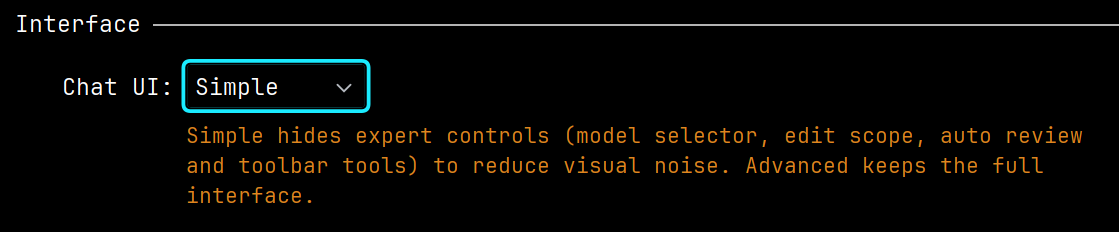
Simple mode reduces the chat interface to the controls most developers use every day: the agent selector, the input field, and the send button.
Extra panels and settings stay hidden. Message action buttons appear only when you hover over a message. If you need advanced controls, you can switch back to Advanced mode in chat settings.
This is useful if you are new to Explyt, keep the chat in a narrow IDE window, or want fewer controls on screen while coding.
Performance improvements for long agent tasks
Explyt 5.12 reduces interruptions in long conversations and multi-step agent work. The release fixes a UI freeze during automatic retry and speeds up checks for files ignored through agent access settings.
Long tasks with subagents should also continue faster. When a subagent has already inspected the project and found the relevant files, Explyt rereads less of the same context on the next step.
This helps in larger code changes where the agent needs to understand the project, edit code, wait for review, and then return to details without repeating the same project scan.
Chat, MCP, and stability fixes
Explyt 5.12 fixes several chat and tool issues. Assistant messages should no longer be cut off while the response is being generated or after it finishes. The editor window should stop jumping in one common case. Tool output links to files again instead of staying on "Loading...".
The model setup screen and the progress hint shown while subagents are working were also fixed.
Skill creation now happens through the agent in chat. Instead of filling in every field manually, you can describe the skill you need, and the agent prepares the required Markdown files in the right folder.

The agent now uses connected Skills more reliably, works better with project run settings, and stops operations more cleanly. If subagents were stopped or the chat was reloaded, continuing a long task should be easier.
MCP setup is simpler, too. If the built-in JetBrains MCP server is already enabled in the IDE, Explyt can connect to it automatically. You do not need to copy the server address into the MCP server list manually.
When an MCP tool returns several files or images, Explyt saves them as separate files and leaves links in the main response. This is easier to use than one large output block, especially when an MCP server works with a browser, file system, or external tools.
This release also includes fixes for account initialization and balance issues.
Explyt 5.12 is most useful for developers who already use JetBrains IDEs and want AI assistance inside their existing coding workflow. It is especially relevant if you:
- use AI agents for multi-step code changes, not only single prompts;
- need to generate or improve tests in Rider, WebStorm, or PyCharm;
- work in mixed-language projects where dependency lookup matters;
- want to review AI-generated edits before applying them;
- prefer a simpler chat UI while coding;
- use MCP tools or long-running agent tasks.
Reproduce, inspect and fix inside JetBrains IDEs, with the debugger, run configurations and IDE facts as evidence.