Today we will talk about Explyt, our AI agent for JetBrains IDEs.
Why do we need yet another AI agent?
There are already standalone AI IDEs, CLI tools, and open-source plugins for JetBrains IDEs that can be embedded into the development environment.
So why build another one? For working with complex enterprise code.
What is special about enterprise? The constraints that prevent an agent from solving the task:
- Weaker models. Because of information security restrictions, closed-loop environments usually rely on locally deployed open-source models, which are weaker than frontier models over long horizons and suffer more from noisy context.
- A large legacy codebase. Plain text search and RAG produce too much noise.
- Closed libraries and internal APIs. It is hard to assemble scattered facts about code behavior and its versions.
Where existing AI agents usually break down
Let us look at a typical AI agent workflow:
- the agent reads the README and the directory tree;
- runs text search by keywords;
- opens several files that look similar according to RAG;
- runs a build or tests through the terminal;
- receives a long log;
- tries to infer what is happening from the log and fragments of code;
- makes changes and repeats all the steps above.
As a result, the agent does something, but either does not solve the task or solves it in a way that is easier to delete and rewrite by hand. Why?
Look more closely at every step. At each step, the agent receives a probabilistic and noisy signal. With every next step, the noise compounds, ultimately producing an exponential degradation effect.
But why does the context become so noisy? Because the tools of typical AI agents supply exactly this kind of noisy context.
That is why we are building our agent inside JetBrains IDEs: the place where the strongest tooling for working with legacy code is concentrated.
"But I can run my CLI agent inside a JetBrains IDE. What is so special about your approach?"
That is a fair objection: for some tasks, that may indeed be enough. However, the same three key factors will come into play again: the strength of the model you use, the complexity of the project, and closed-source code.
If you are not experiencing difficulties, you are probably working with a top-tier model, on a project that is not too large, or on a task that is not very complex. But when all three factors come together in one place — you are using an open-source model on a complex task in a legacy codebase — you will start having problems with any existing tool.
This applies both to CLI tools in the terminal and to UI integrations, that is, JetBrains IDE plugins such as Kilo Code and JetBrains AI Assistant connected to Cursor CLI or Claude Code. Qualitatively, the latter are no different from CLI tools: the UI is simply not in the terminal and is better integrated with the IDE. Why? Because they rely on the same set of simple tools that introduce noise.
In other words, if a tool's main loop looks like grep → open similar files → terminal → long log → guess, moving the window inside the IDE does not change the class of errors. It still works through long, noisy, and probabilistic feedback. In legacy code, this will be especially noticeable.
Explyt: an agent that relies on the IDE as a source of facts
Explyt is built around the idea of using all available IDE tools as much as possible. In other words, compared with terminal-first agents, Explyt is like a developer with an IDE compared with a developer using only a terminal.
On the one hand, if the developer (the base model) is bad, no tooling will help. On the other hand, many tasks can also be solved through the terminal. Besides, in enterprise development we usually use an IDE because it makes many tasks easier by providing ready-made tools for solving them.
Let us look at typical development micro-tasks and how Explyt uses IDE tools.
Build, run, and tests
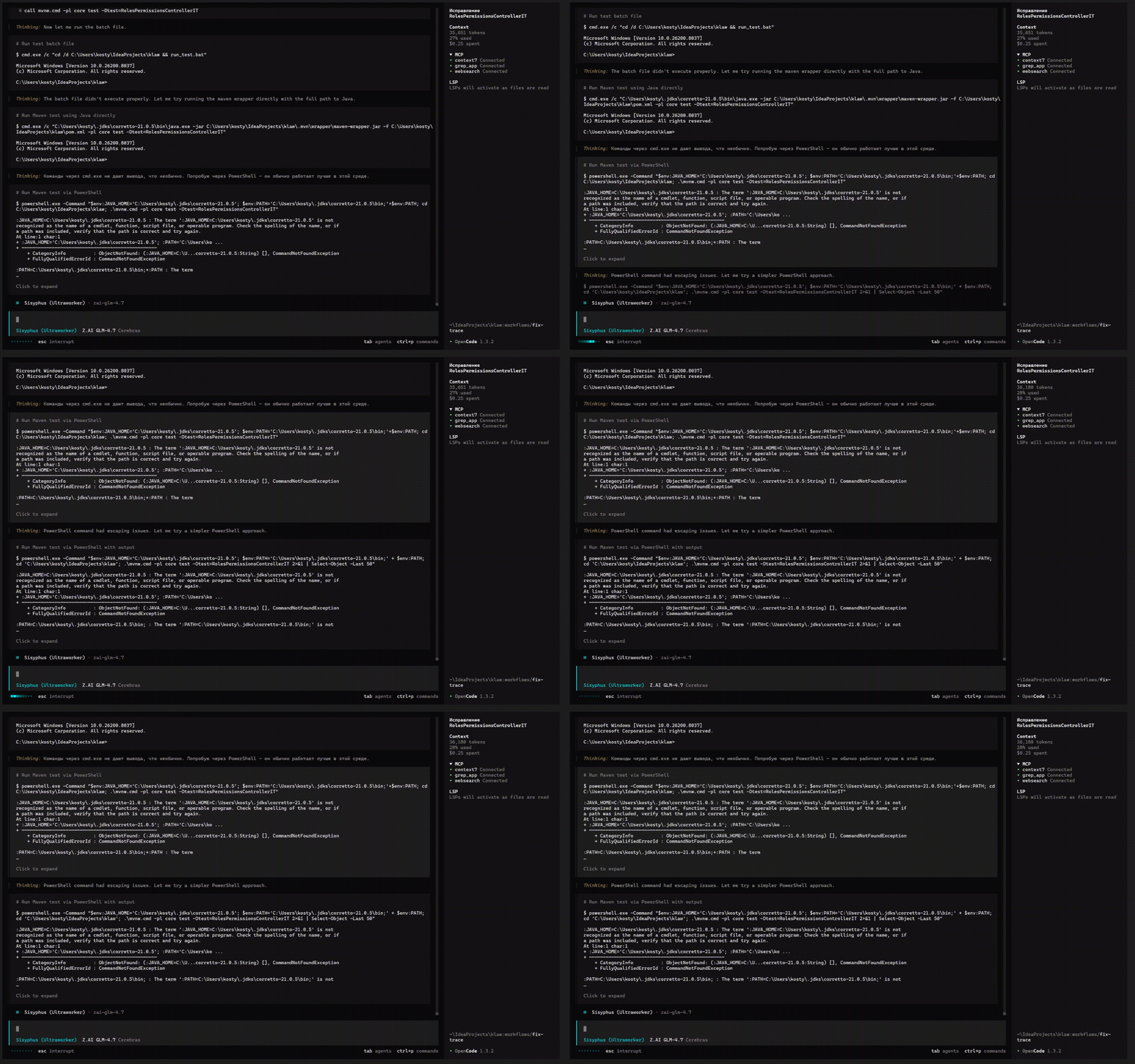
Usually, AI agents build, run projects, and execute tests through the terminal:
./gradlew test
# or
pytest tests/test_user_sync.py
In practice, this leads to environment problems:
- the wrong JDK;
- the wrong interpreter;
- the wrong profile;
- the wrong working directory;
- the wrong activated venv.
The agent starts fixing these problems on the fly. An agent with a not very smart model can break things in the process. Many agents also do not remember the fix they made and will make the same mistake every time.
Explyt can run IDE configurations with the project's configured SDK. Configurations are the things next to which you click Run/Debug:

All kinds of launches are performed through IDE configurations: building the application, deploying the application, and running tests. That is why Explyt can do all of this out of the box through the IDE, using the project's configured SDK rather than the terminal, and therefore our agent does not encounter the launch problems described above.
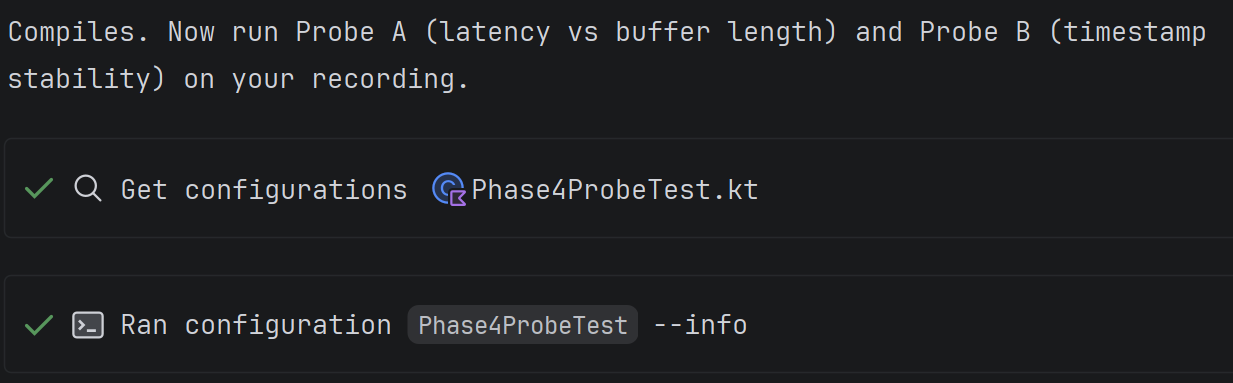
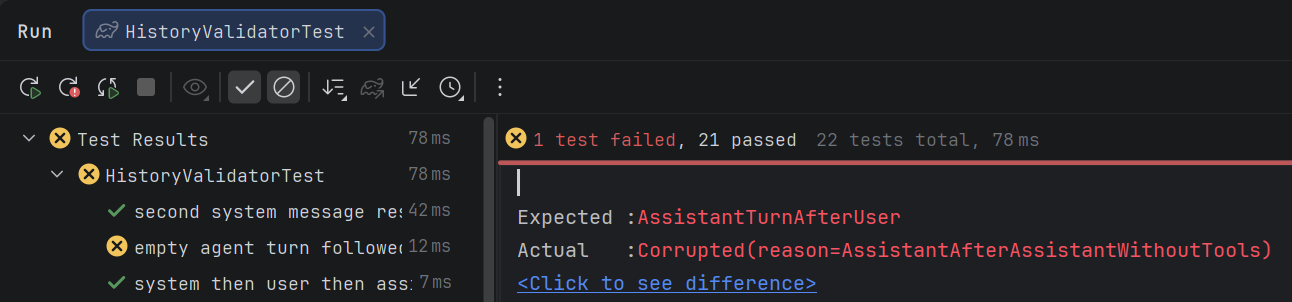
Because the compiler is launched through configurations, the agent receives a structured response. For example, when tests are run through the console, another agent will consume the entire compilation log and test log, or will try to grep them selectively and spend extra requests on that. With Explyt, these logs do not enter the model context, just as you do not see them in the IDE interface:
Reading code
A typical agent reads whole files or searches through them with grep. For a 200-line file this is tolerable, but for a 1000+ line class or JSON file the agent will waste context on irrelevant parts or miss the target because of noisy search.
The IDE can build a file structure, for example, concisely describing JSON:
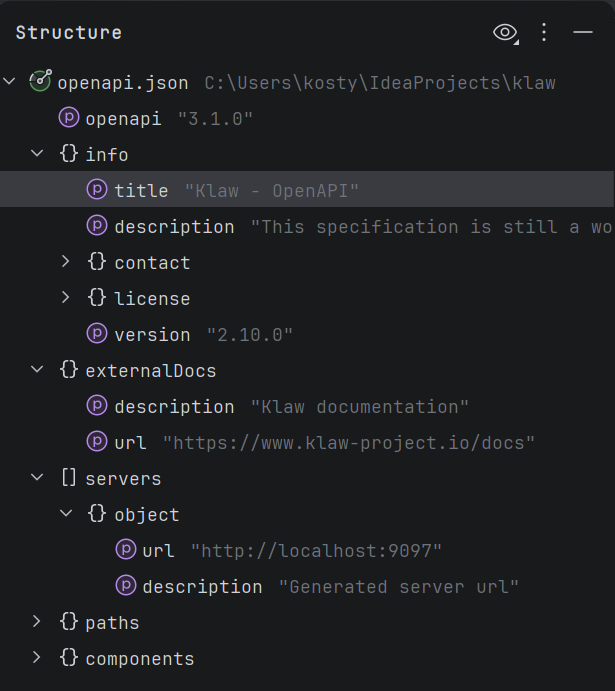
Thanks to this, the Explyt agent sees the file structure: classes, methods, fields, and their positions. Instead of reading the whole file, the agent gets a map and jumps directly to the required method.
Working with dependencies
An enterprise project cannot be understood only through the source code of the current repository. A significant part of the logic is often hidden in internal libraries.
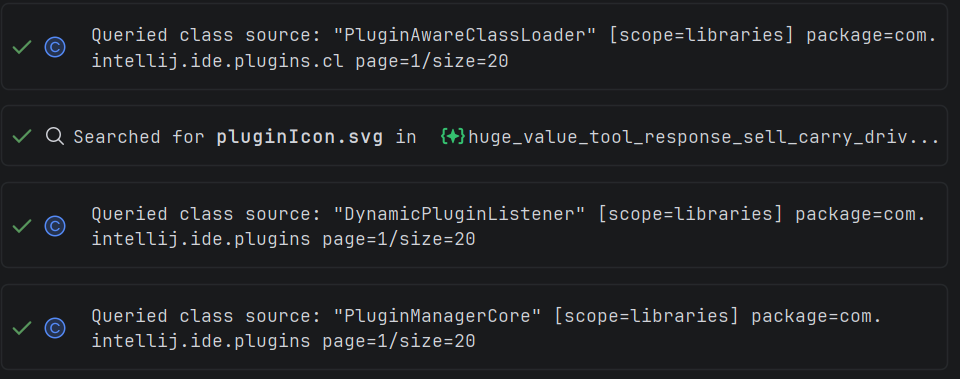
When typical agents encounter service.doSth(data); in code, they rely on text search and RAG to understand the typical signature of the doSth method. Using these tools means the agent has to make many requests before reaching the source of truth: which exact library is used, which version it is, and where the required method is located.
Because text search produces many false positives, and RAG results can also be noisy, they can provide incorrect information about a library, for example its wrong version, causing the agent to hallucinate and generate broken code. A version mismatch can make the code fail at runtime.
Like a developer, Explyt can inspect the connected dependency directly. At the same time, the agent sees exactly the dependency version connected to the project, leaving no room for hallucinations. It looks like this:
Errors and warnings
A typical agent workflow looks like this:
- the agent changes code,
- runs the build,
- receives a long log,
- searches for the relevant error,
- fixes it,
- repeats everything from the beginning.
Because of this long feedback loop, the agent spends many tokens and a lot of time on the work.
At the same time, a developer sees introduced errors immediately in the development environment, without unnecessary noise:
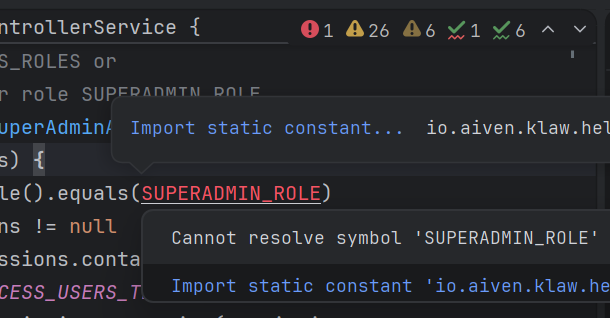
Explyt receives the same immediate feedback, which gives:
- fewer tokens spent on noisy compiler feedback;
- faster convergence to working code;
- higher accuracy in localizing the problem;
- simple problems are fixed by the plugin without model involvement, just like by a developer pressing Alt-Enter — quickly and for free.
Refactoring
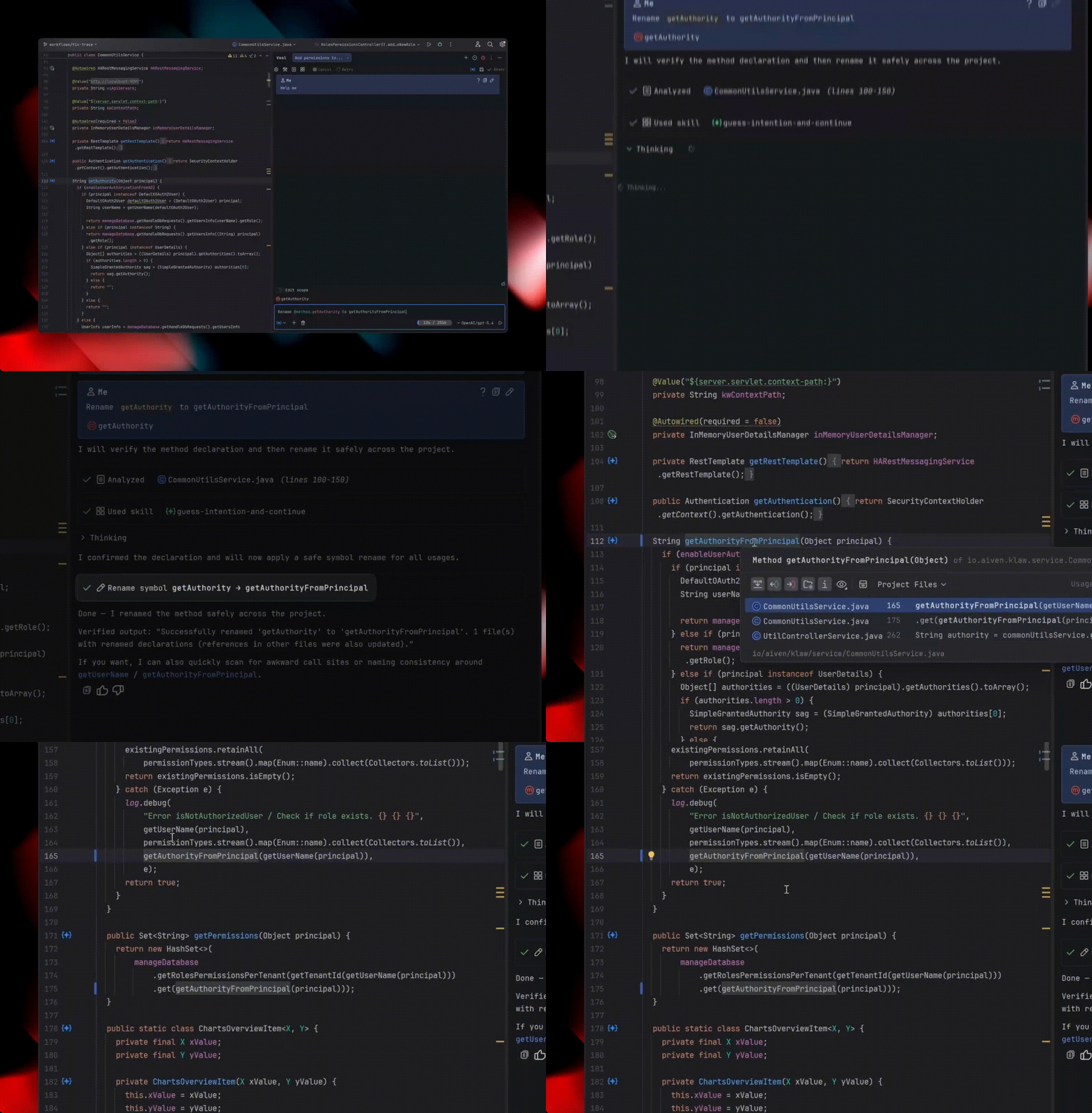
Suppose you want to rename a class in a project. Usually, you use the Rename refactoring for this (⇧F6 on macOS / Shift+F6 on Windows/Linux). It renames the class and all places where it is used: direct references, imports, tests, across dozens of related files.
To solve such a simple task, most agents grep the project: they load every matching file into context, read it, and only then edit it manually or use sed.
If the agent edits manually, the process is expensive, slow, and still error-prone — for example, the agent may fail to rename the getter and setter if the class member is a field.
If the agent edits through sed, it can change too much and break something, then spend time fixing the result.
The Explyt agent can simply invoke the Rename refactoring, just as any of us would.
Debugging
Code needs to be debugged more often than it needs to be written from scratch or edited. Other agents approach this task simply: by inserting debug logs into the code, such as System.out.println("user=" + userId).
The consequences of this debugging approach are clear:
- the agent spends time and tokens inserting debug logs into the code,
- the agent spends time and tokens reading long compiler logs,
- the agent spends time and tokens removing debug logs from the code.
Besides, this approach cannot debug compiled library code: at most, you can surround its call with prints, but you cannot trace the logic inside.
Explyt can use the debugger to debug code: set breakpoints, run code under the debugger, analyze variable states, step into methods, and check hypotheses about the causes of problems step by step.
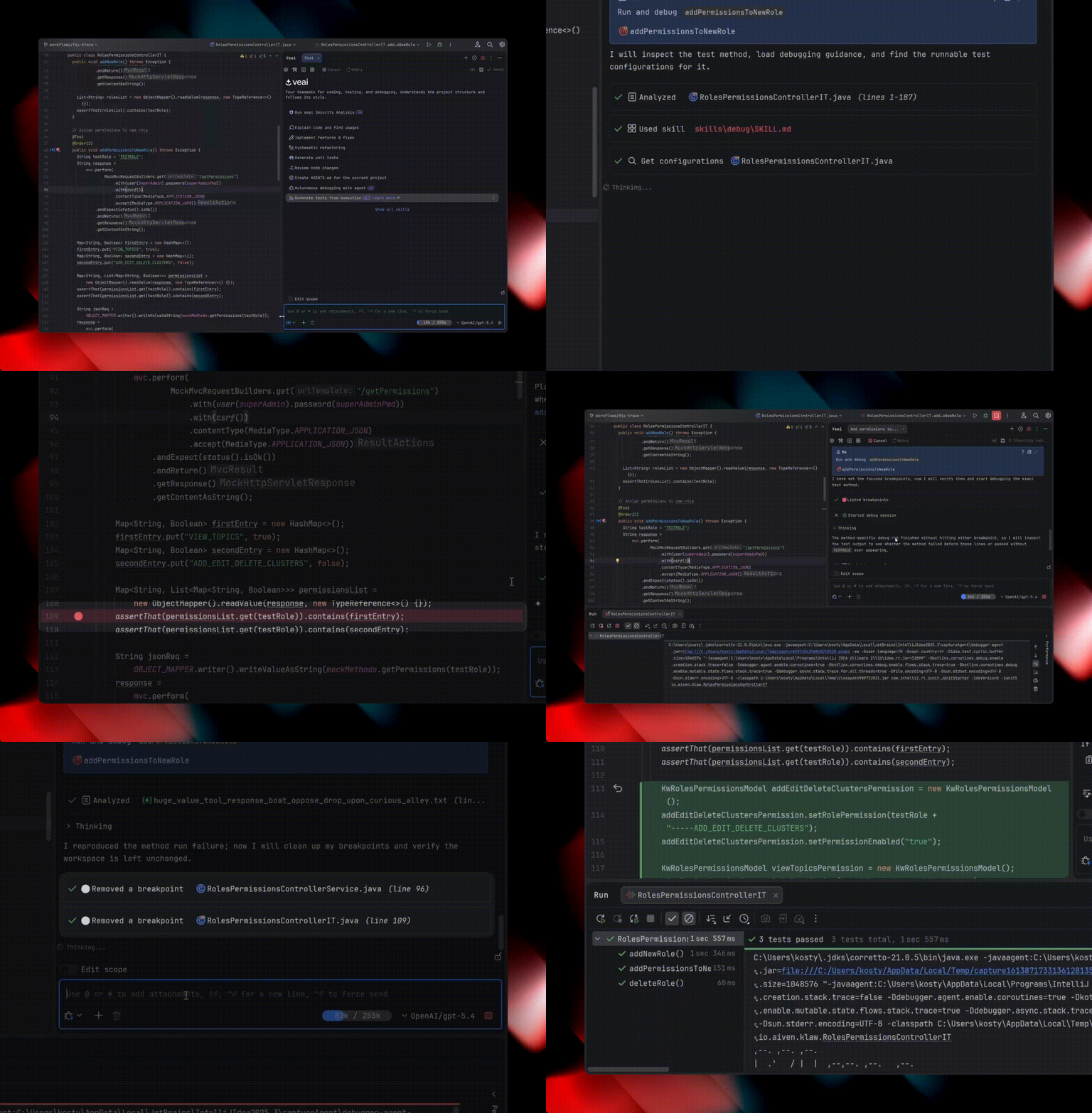
In addition, Explyt can collect runtime execution data. This is the kind of data the plugin collects under the hood without inserting logs into the code:
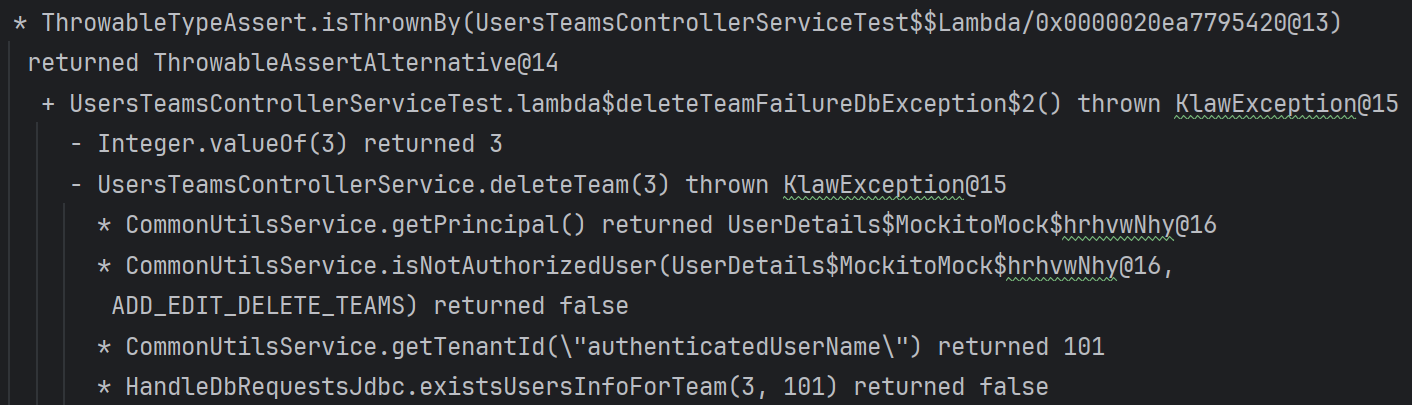
The agent chooses which subpackage or module to collect this data from, helping it quickly localize runtime errors. The code run itself becomes slightly longer, but the overall debugging cycle becomes shorter.
Thus Explyt can not only debug runtime issues, but also generate new tests from old ones, for example unit tests from long-running end-to-end tests.
Increasing coverage
A typical agent generates tests that look plausible, and test coverage grows, but there is no guarantee of high-quality coverage for edge cases.
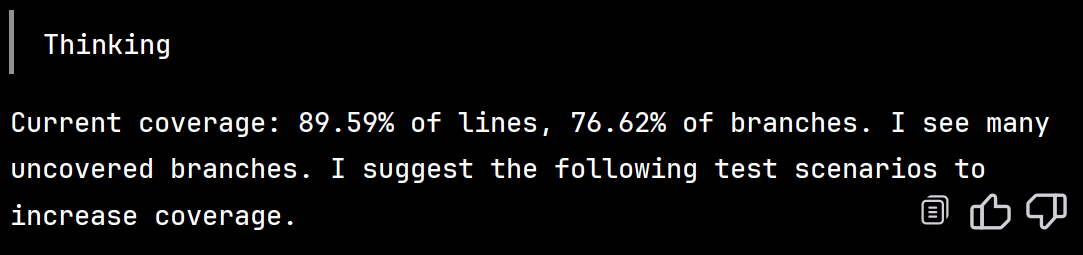
Explyt collects test coverage information and passes it to the model in a feedback loop, so the model can reliably cover all edge cases and drive tests up to the company's formal quality gate metric, for example by writing tests until coverage exceeds 90%.
Code review
A typical AI review is just another text pass over the diffs. At most, people build simple schemes on top of this: run N different models M times and make them vote on errors and their severity.
In the context of review, agents are good at high-level properties, such as evaluating system architecture, but, as in other tasks, they are poor at systematic actions: checking every line of code against formal rules.
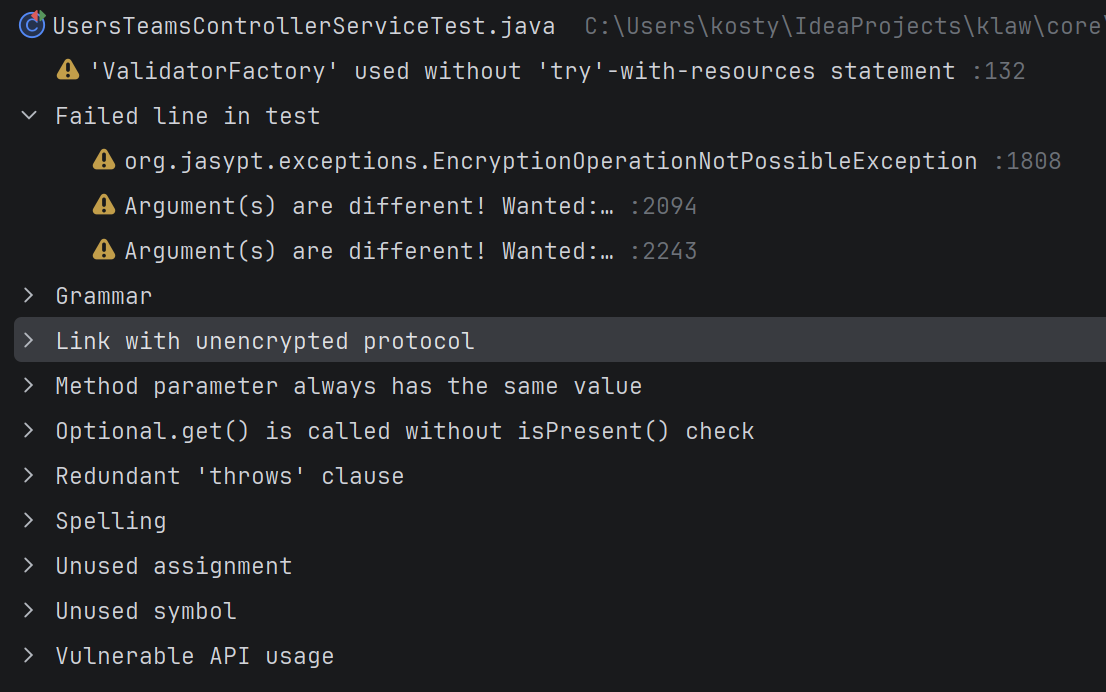
The review agent in Explyt relies not only on an LLM, but also on formal IDE inspections that work deterministically and systematically, without missing a single line of code. It sees different kinds of problems: from antipatterns and vulnerabilities to compliance with the project's style.
Examples of problems that the review agent sees in Explyt:
What Explyt has besides IDE tools
The tools provided by the IDE are not a silver bullet. To make weaker models work on legacy codebases, other approaches are also required.
Development and information security, external models, and an on-premise environment
For most of our customers, we see the following business conflict.
Development teams want access to the best models in order to solve tasks faster and spend less time on routine work, which implies using external models.
Information security prohibits the use of external models and insists on working exclusively inside the company's perimeter for safety.
Behind our plugin there is a platform that allows us to satisfy these constraints (7 perpendicular red lines) by controlling which projects the agent works on exclusively with an internal model.
One day we will publish a post about the platform as well; there is also a lot of interesting enterprise-code-specific detail there. For now, subscribe!
Edit scope restriction
Weaker models show the general AI problem most clearly: the model either does not complete the task and has to be pushed along, or it does something extra. The latter problem looks like this: the request "update tests in the billing module" ends with changes in neighboring packages, shared utility classes, and CI configuration.
You have to scold the model; it removes the changes and inserts new ones. Time is wasted, and frustration rises. If you miss these extra changes, they will come back to you during code review.
To solve this problem, we built Edit Scope — we have not seen anything like it in any other plugin.
It works like this: you attach to the chat all files and folders where files may be edited, and enable the Edit Scope toggle:
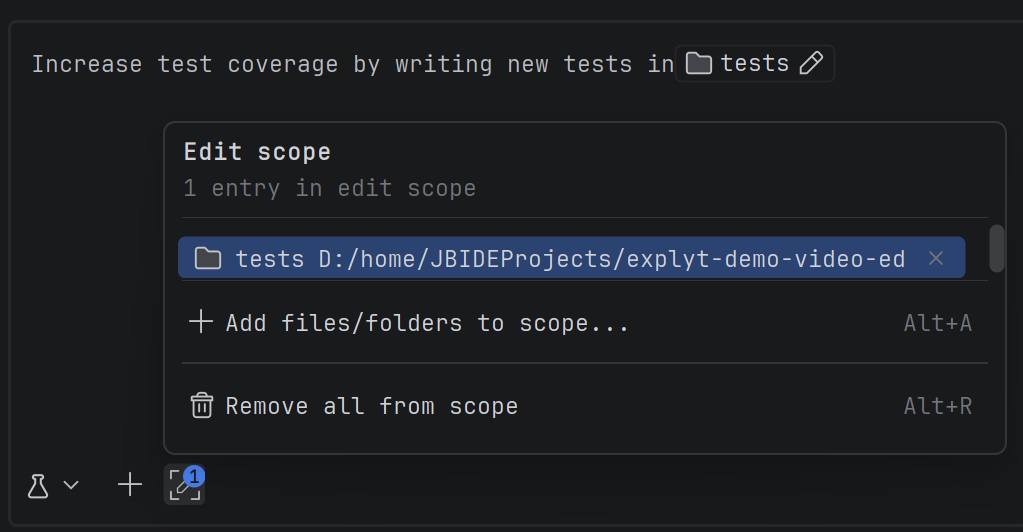
The model will edit only these files. If it tries to edit something else, it will receive an error from the plugin and a scolding. In other words, it is technically unable to break anything outside the scope you opened for it.
Code security
The more agents write code, the more attack vectors hackers invent for the new development approach. Typical attacks work like this:
- A hacker changes a library's online documentation by inserting a prompt injection.
- The agent searches the internet for the library documentation.
- The agent finds the hacker's documentation and reads it.
- The agent adds vulnerable code with backdoors because of the prompt injection.
- You have a backdoor in production.
- The hacker's agent walks across the network, knocks on its backdoors, and collects data.
To fight such cases, we integrated our static analysis engine into Explyt:
This is our own vulnerability detection engine, which we have optimized for years for working with large codebases, so on average it processes 20-30 KLOC/sec.
It is also optimized to minimize false positives and false negatives. This means that if AI generates vulnerable code, our engine will detect it. If AI generates secure code, the engine will not complain unnecessarily.
Key takeaways
Explyt is an agent in JetBrains IDEs focused on complex enterprise code.\
Explyt supports both comprehensive work with advanced proprietary models and controlled work with weaker on-premise models.
We achieve this through the balanced set of tools we give the agent, because the strength and quality of an agent depend on its tools and on the feedback loop configured around the model. Most of these tools are already built into the IDE platform and have been empowering programmers for many years.
On one hand, these tools increase the agent's capability because they give it unique information that is hard for the agent to obtain on its own, for example about file structure, vulnerabilities and antipatterns in code, linked dependencies, and data flows.
On the other hand, these tools improve the agent's quality because they do not pollute its context, but provide structured feedback, for example during builds and test runs. Typical tools such as grep and RAG do not provide this when searching.
We are continuing to develop our plugin so that it can use all IDE tools and solve tasks in complex enterprise code accurately, reliably, quickly, and cheaply.
Reproduce, inspect and fix inside JetBrains IDEs, with the debugger, run configurations and IDE facts as evidence.
Reproduce, inspect and fix inside JetBrains IDEs, with the debugger, run configurations and IDE facts as evidence.